

Who can do this: Users with the Manage Job Req Settings permission turn the questions on for a job req. The EEOC dashboard needs Company Dashboard Access.Availability: The EEOC dashboard needs to be turned on for your account. Ask your Customer Success Manager.
Ask the questions on a job req
The questions are part of each job req’s application form, as the EEOC Compliance Questions row. They’re Hidden on new job reqs.1
Open the application form
Open the job req and go to Setup, then Application Form.
2
Turn on the questions
On the EEOC Compliance Questions row, choose Required. This row can only be Required or Hidden; there’s no Optional choice.
3
Save
Click Save at the top of the page.
What candidates see
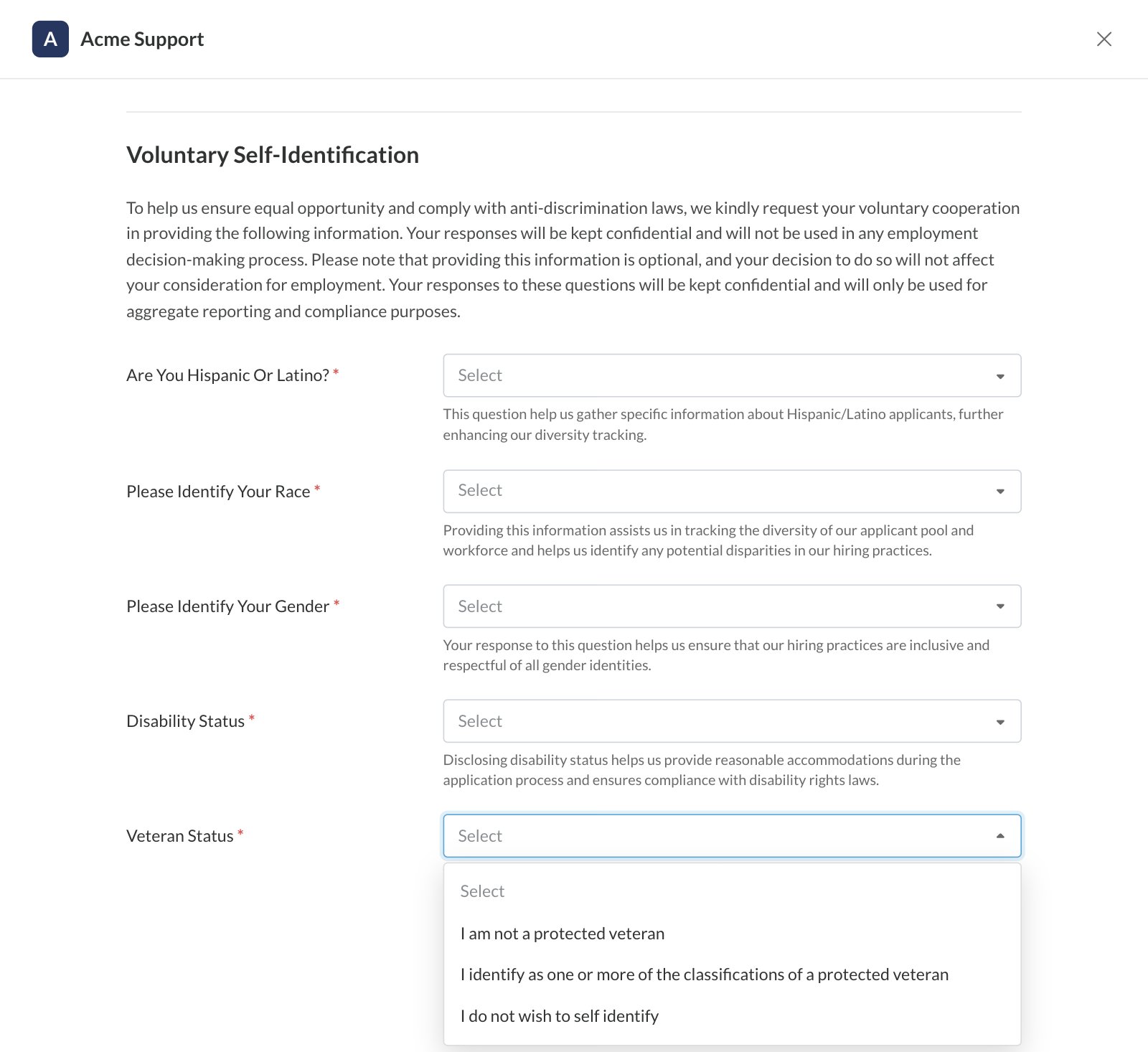
On their application form, candidates see a Voluntary Self-Identification section. It explains that answering is voluntary, that their answers are kept confidential and won’t be used in employment decisions, and that they’re used only for aggregate reporting and compliance. Then it asks:- Are you Hispanic or Latino?
- Please Identify your Race
- Please Identify your Gender
- Disability Status
- Veteran Status
How the answers are kept
- One set per person. The answers belong to the candidate, not to one application. If they answer again on a later application, the new answers replace the old ones.
- Not shown where your team works with candidates. Individual answers don’t appear on the Candidate Application, the Candidate Profile or the Candidates page, and they’re not included in exports.
- Not part of scoring. Like the rest of the application form, the answers don’t affect any score.
- Reported on the EEOC dashboard. The dashboard’s charts show totals across candidates. Its User Data table lists individual answers, so keep access to it limited.
The EEOC dashboard
The EEOC dashboard is only available when it’s turned on for your account. Click Dashboard in the top navigation, then choose EEOC Dashboard from the dashboard menu. Like the other company dashboards, it covers every job req in your account; use the Job Profile and Job Req controls to focus. Other controls include Application Date, Candidate Status and each self-identification question. The Show Non-Responders control is set to No by default.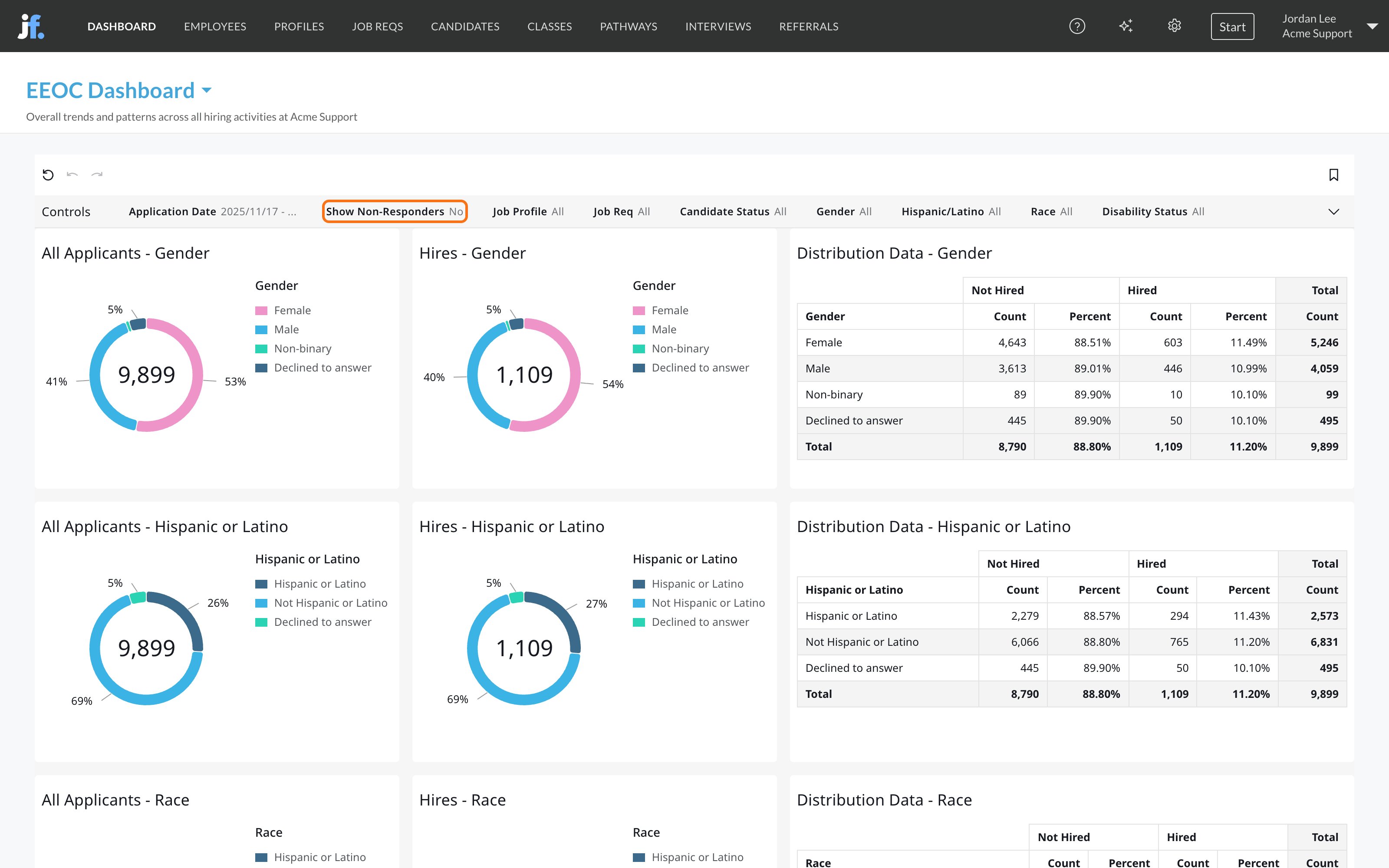
Use Distribution Data to compare hire rates across groups. How to interpret the results, and what to do about them, are questions for your legal or compliance team.
Below these, the User Data table lists individual applications with each candidate’s name, email and self-identification answers. Because it shows individual answers, limit Company Dashboard Access to the people who need it.
FAQ
Do candidates have to answer?
Do candidates have to answer?
When the questions are turned on, candidates must pick an answer for each one, but every question includes “I do not wish to self identify”. Sharing the information is always voluntary.
Can recruiters see how a candidate answered?
Can recruiters see how a candidate answered?
Not where they work with candidates. Individual answers aren’t shown on the Candidate Application, the Candidate Profile or the Candidates page, and they aren’t included in exports. The EEOC dashboard’s User Data table does list individual answers, so only give Company Dashboard Access to people who should see them.
Are EEOC answers used in scoring or hiring decisions?
Are EEOC answers used in scoring or hiring decisions?
No. They don’t affect any score, and candidates are told their answers won’t be used in employment decisions.
Why can't I make the EEOC questions Optional?
Why can't I make the EEOC questions Optional?
Every question already lets candidates decline to self-identify, so the section is either shown (Required) or not (Hidden).
Can I export EEOC data?
Can I export EEOC data?
No. EEOC answers aren’t included in Journeyfront’s exports. Use the EEOC dashboard for aggregate reporting.
Do I need to turn the questions on for every job req?
Do I need to turn the questions on for every job req?
Yes. The setting is part of each job req’s application form. When you duplicate a job req, the copy keeps the original’s application form, including this setting.
Related
Application form
Choose which fields candidates fill in, including EEOC.
Dashboards overview
Find the EEOC dashboard and the rest.
Export data
What you can download, and what stays in Journeyfront.
HRIS integrations
Send hires and their details to your HR system.