

Who can do this: Admins with the Company Settings Access permission connect Indeed and turn it on for your job boards.Availability: Posting to Indeed costs nothing extra from Journeyfront. Jobs go up as free, organic listings; if you sponsor them, Indeed bills you directly.
Set up Indeed
Before you start, you need an Indeed employer account (create one at employers.indeed.com if you don’t have one), the company name on that account, and at least one job board with active postings.1
Activate Indeed
Go to Settings, then Integrations, and open Indeed under Job Board. Set Activated to Yes. Enter your Company Name exactly as it appears in your Indeed employer account. Optionally, enter the Email Address associated with your Indeed account. Save.
2
Turn on Indeed for a job board
Go to Settings, then Job Boards, and open the job board. On the General tab, under External Job Board Partners, check Post Jobs to Indeed. Optionally check Allow Indeed Easy Apply and choose the Source that Easy Apply candidates are tagged with. Save, and repeat for each job board that should go to Indeed.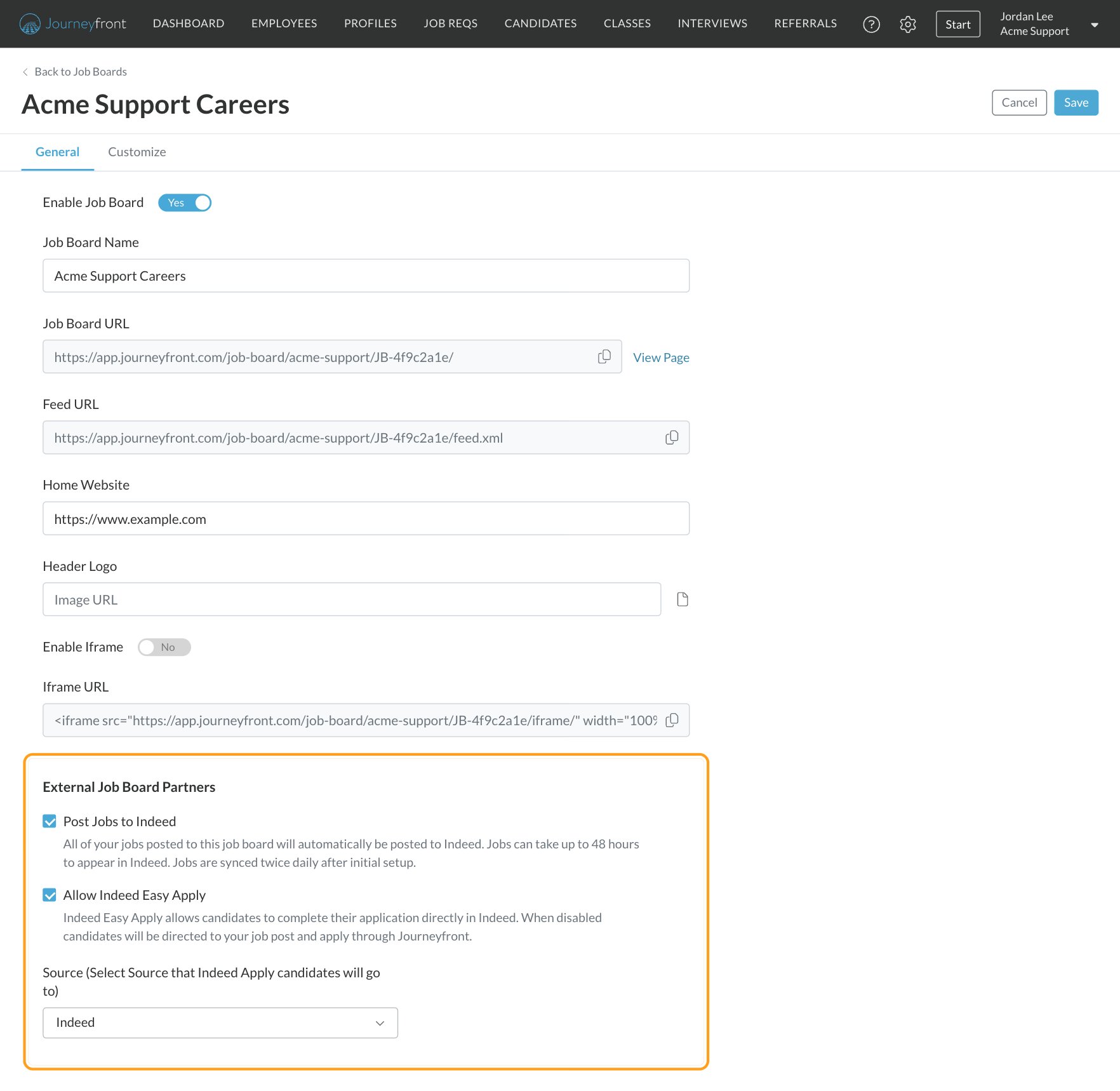
3
Connect your Indeed employer account
In Indeed, go to Manage Jobs and connect Journeyfront as your ATS (Indeed’s wording varies). You only do this once. Without it, your jobs still appear in Indeed search, but not in your Indeed dashboard, so you can’t sponsor them.
Choose how Indeed candidates apply
Control what Easy Apply asks for
The job req’s application form controls the Easy Apply form on Indeed. Indeed always asks for name and email. Beyond that, your own personal fields are required on Indeed when they’re required on your application form, and optional when they’re optional. A few fields work differently:- Phone and resume use Indeed’s own fields on its form.
- Education and work history aren’t asked on Indeed. Candidates fill them in when they finish their application in Journeyfront.
- EEO questions are asked on Indeed only when they’re set to Required on your application form.
Customize the Easy Apply Invite email
When someone applies with Easy Apply, Journeyfront emails them the Easy Apply Invite with a link to finish their application. To change it, go to Settings, then Templates, then E-mail Template, open the System Emails tab and edit Easy Apply Invite. Until you edit it, candidates get the standard system version. You can change the subject, body, sender and merge fields; your logo and branding come from your account.See Easy Apply candidates in Indeed too (optional)
Easy Apply candidates always come into Journeyfront. If you also want them in Indeed’s Candidates tab, link each job in Indeed: open the job under Jobs (or Manage Jobs), click Manage Candidates (wording varies) and confirm. The job then shows a link icon in your Indeed jobs list. Skip this if your team manages candidates only in Journeyfront.Check a posting’s sync status
Open the job req and go to Setup, then Job Postings, and open the posting. Under External Job Board Posts, the Indeed row shows its status, Synced, Not Synced, Expired or Failed to Sync, and the date it was last sent to Indeed under Date Added.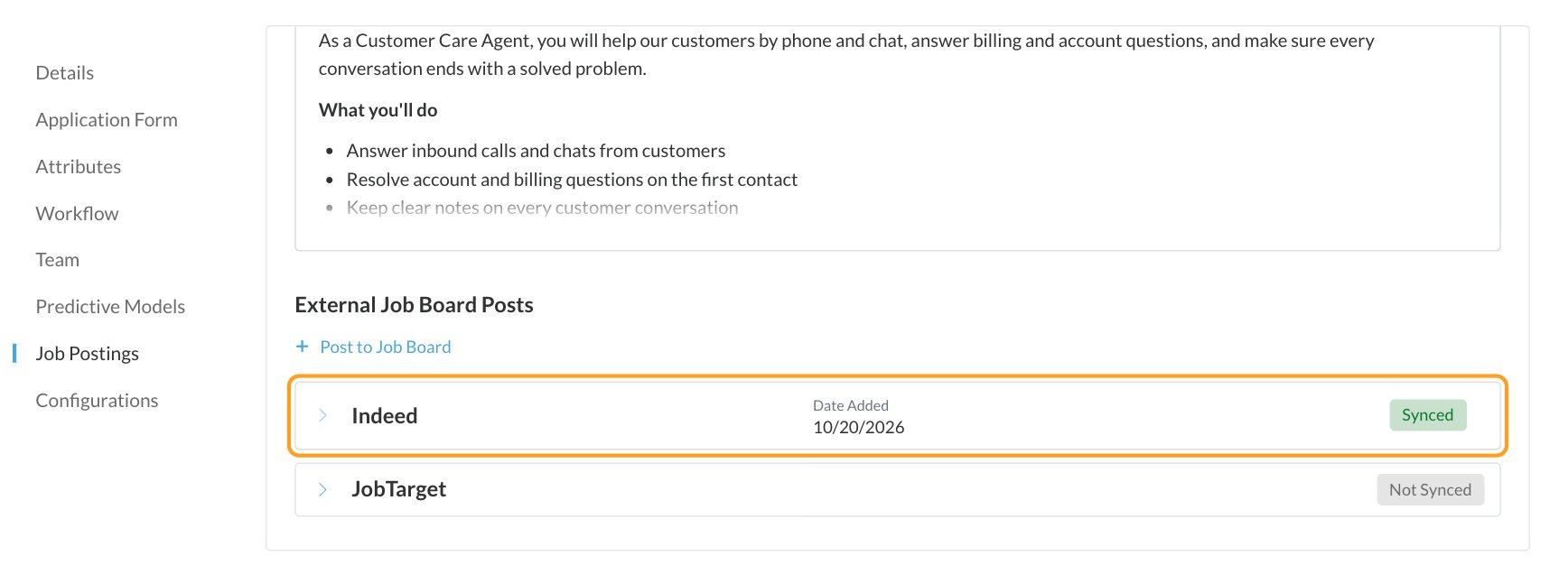
- The posting is active and has a country set.
- The posting has a title and description.
- Post Jobs to Indeed is checked on its job board.
- Indeed is Activated in Integrations, with a company name filled in.
Take a posting down
Deactivate the posting in Journeyfront and it expires on Indeed automatically. Closing, archiving or deactivating the job req does the same, and so does unchecking Post Jobs to Indeed on the job board, which takes down every posting on that board. There’s no separate pause: to stop a posting for a while, deactivate it or close the job req.You can also pause or close a job inside Indeed, but that change doesn’t come back to Journeyfront. The posting stays active in Journeyfront and may be sent to Indeed again the next time it’s saved. Always take postings down in Journeyfront.
Sponsor your Indeed postings
Sponsorship is set up entirely in your Indeed employer account. Go to Manage Jobs, find the posting, and attach it to a sponsored campaign with your budget and targeting. Journeyfront doesn’t see or control your Indeed budget.What candidates see on Indeed
With Easy Apply off, the candidate clicks Apply on company site on Indeed, lands on your Journeyfront job posting and completes your full application there. With Easy Apply on, the candidate clicks Apply now and fills in a short form inside Indeed. Shortly after, Journeyfront adds them, pre-fills their application form with their Indeed answers, and sends the Easy Apply Invite email. They click the link, set a password, and continue straight to the next steps, such as assessments. If something required couldn’t be collected on Indeed, they’re asked for it before they continue.How Indeed candidates are tagged
- Easy Apply candidates get the Source set for Easy Apply on the job board, or Indeed if none is set.
- Candidates who apply on your site are linked to the job posting they came through.
FAQ
Do I have to pay to post to Indeed?
Do I have to pay to post to Indeed?
No. Jobs go to Indeed as free, organic listings, and Journeyfront doesn’t charge for the integration. You only pay Indeed if you choose to sponsor a job from your Indeed account.
Why don't my jobs show in my Indeed employer dashboard?
Why don't my jobs show in my Indeed employer dashboard?
Usually your Indeed employer account isn’t connected to the Journeyfront feed yet. In Indeed, go to Manage Jobs and connect Journeyfront as your ATS. Also check that the company name in Journeyfront’s Indeed settings matches your Indeed account exactly.
Why are Easy Apply candidates in Journeyfront but not in Indeed?
Why are Easy Apply candidates in Journeyfront but not in Indeed?
The job isn’t linked in Indeed yet. Open the job in Indeed and click Manage Candidates (wording varies). No candidates are lost in the meantime; they’re already in Journeyfront.
Indeed says a job is managed by another company account. What does that mean?
Indeed says a job is managed by another company account. What does that mean?
The job is linked to a different Indeed employer account, usually a colleague’s. Only one Indeed account can manage a job’s candidates at a time, so ask that person to unlink it, then link it from your account. Journeyfront isn’t affected; postings and candidates keep flowing either way.
Can I edit a posting directly on Indeed?
Can I edit a posting directly on Indeed?
Edit it in Journeyfront instead. Every save in Journeyfront is sent to Indeed, and an edit made only on Indeed may be overwritten the next time the posting is saved in Journeyfront.
Can I use Easy Apply on some job boards and not others?
Can I use Easy Apply on some job boards and not others?
Yes. Post Jobs to Indeed and Allow Indeed Easy Apply are set per job board, so each board can work differently.
Related
Job board integrations
Compare Indeed, JobTarget and Appcast.
Job boards (career site)
Set up the job boards whose postings go to Indeed.