

Who can do this: Anyone with View Referrals can see reward programs. Creating and changing them takes Manage Referral Settings.Availability: Referrals need to be turned on for your account. Ask your Customer Success Manager.
The Reward Programs tab
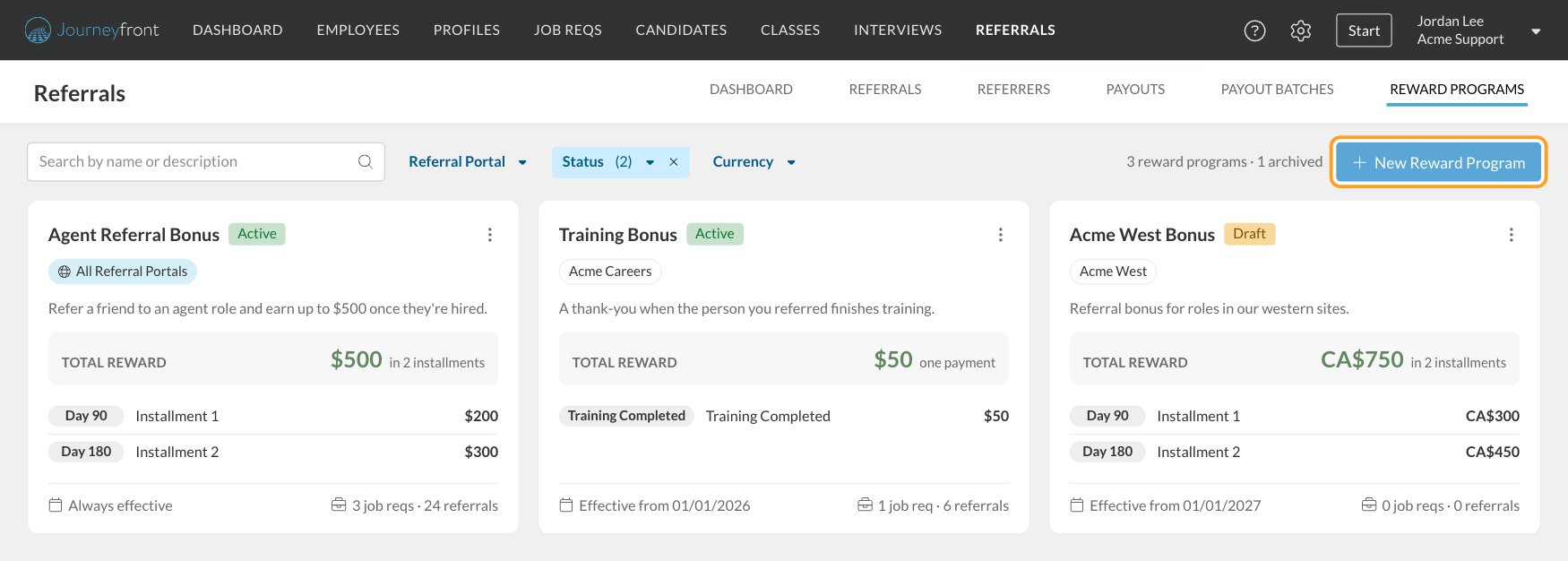
Go to Referrals, then Reward Programs. Each program is a card that shows:- its name and status (Active, Draft or Archived)
- the referral portals it’s on, or All Referral Portals
- the Total Reward and its installments, with when each one is due
- its effective dates and how many job reqs and referrals use it
Create a reward program
1
Start a new program
On the Reward Programs tab, click New Reward Program.
2
Fill in the details
Enter the program’s settings. See the table below.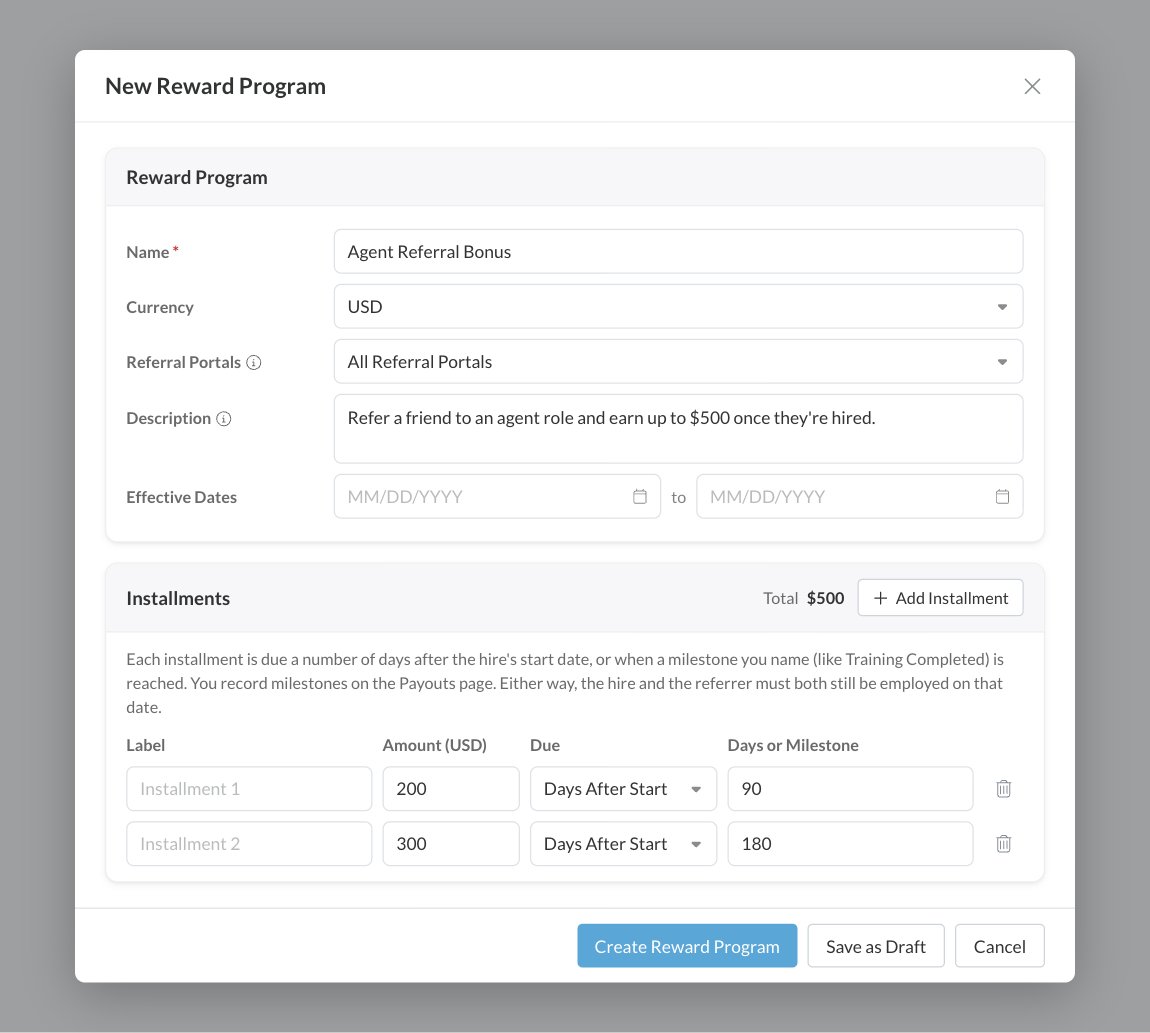
3
Add the installments
Under Installments, add one row for each payment. Click Add Installment for another row. The Total at the top of the card adds them up as you go.
4
Create it or save a draft
Click Create Reward Program to make it active right away, or Save as Draft to finish it later.
Each installment has:
A program can have up to 12 installments. Day-based installments must be in order, earliest first. Milestones can go anywhere in the list.
Days and milestones
A Days After Start installment is earned automatically: its Earned On date is the hire’s start date plus its days. A Milestone installment has no date until someone records that the hire reached it, for example finishing training. You record milestones on the Payouts tab, one at a time or by uploading a file, or with Mark Reached on the referral. See Payouts and Referral details and milestones. Either way, an installment is only earned if the hire and the referrer are both still employed on its date.View a program’s details
Click a program’s card to open its details on the right side of the page.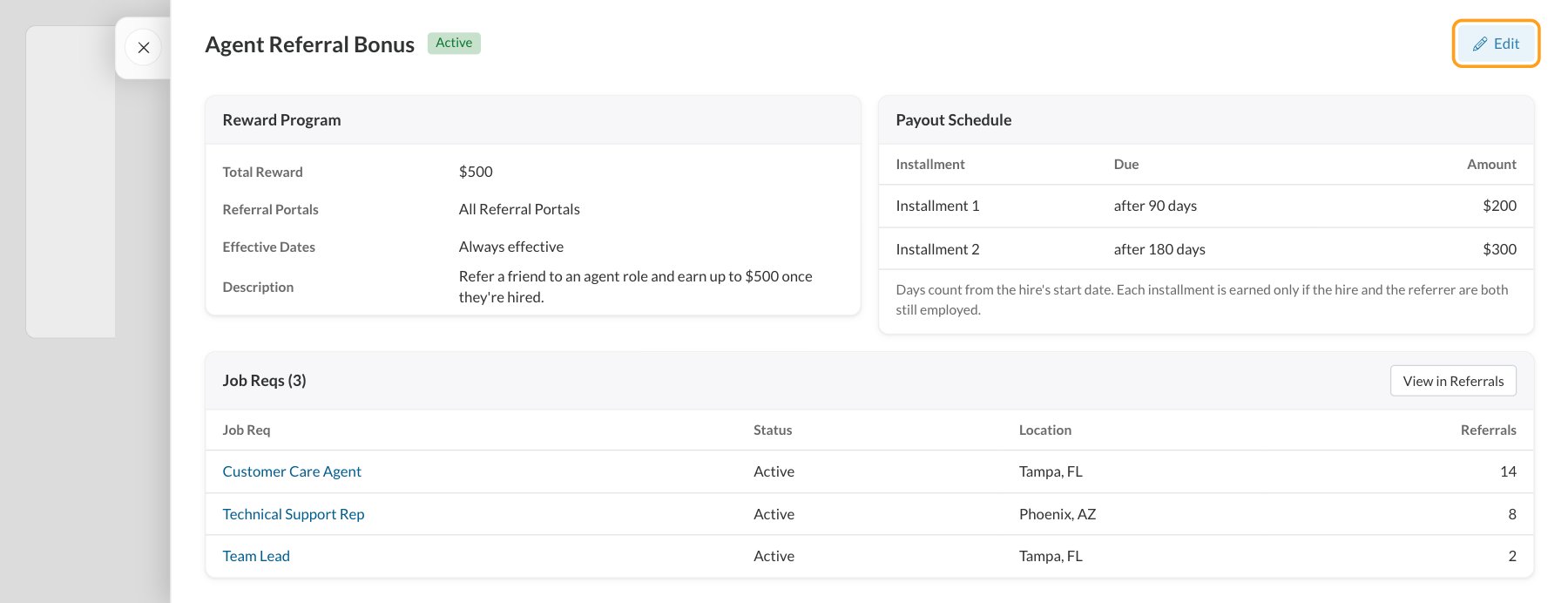
- Reward Program: the Total Reward, Referral Portals, Effective Dates and Description.
- Payout Schedule: each installment, when it’s due and its amount.
- Job Reqs: every job req that uses the program, with how many referrals each one has under it. Click View in Referrals to see those referrals on the Referrals tab.
Changes only apply to new referrals
Each referral keeps the program’s terms from the day it was made. When you edit a program that referrals already use, a note at the top of the form tells you how many referrals keep their original terms. Your changes apply to new referrals only.Drafts, publishing and archiving
Find Publish, Archive and Restore in the menu on the program’s card. A draft’s details panel also has a Publish button. Once a program is published, it can’t go back to being a draft.
Archiving doesn’t touch what referrals already earned. Their payouts carry on as before. Job reqs that use an archived program keep showing it, but new referrals to them don’t earn it. Pick a new program on those job reqs. See Rewards on job reqs.
Delete a program
You can delete a draft at any time. You can only delete a published program if no job req or referral has used it. Otherwise, archive it instead. To delete, click the menu on the card, choose Delete, then click Delete to confirm. This can’t be undone.Programs and portal admins
If your role only covers some referral portals, you only see programs on your portals or on all portals, and new programs you create must be for your own portals. A program that’s shared with portals you don’t manage shows a lock icon instead of a menu. Only someone who manages all of its portals can change it. See Permissions and portal admins.FAQ
Why can't I change which portals a program is on?
Why can't I change which portals a program is on?
Every job req that uses a program must be posted only on that program’s portals. If you try to remove a portal that one of its job reqs is posted on, Journeyfront tells you which job reqs are in the way. Change their portals or their reward program first, then try again.
Why isn't my program in the job req's Reward Program list?
Why isn't my program in the job req's Reward Program list?
Only Active programs can be picked, and only ones that cover every portal the job req is posted on. Publish a draft first, and check the program’s Referral Portals.
What happens to referrals made outside the effective dates?
What happens to referrals made outside the effective dates?
They don’t earn the program. Employees also stop seeing the reward on the portal once the end date has passed.
Can one program pay in two currencies?
Can one program pay in two currencies?
No. Each program has one currency. Create a program for each currency, such as one in USD and one in CAD, and put each on the right portals or job reqs. Totals across currencies are always shown separately, never added together.
Can I pay part of a reward at hire?
Can I pay part of a reward at hire?
Yes. Add an installment with Days After Start set to 0. It’s earned on the hire’s start date.
Related
Rewards on job reqs
Choose which program each job req’s referrals earn.
Payouts
Track each installment from upcoming to paid.
How referrals work
The big picture and a setup checklist.
Permissions and portal admins
Control who can create and change programs.