

Who can do this: View Referrals to see statuses and Reward Status. Manage Referrals to change a status, mark a referral reviewed or move the credit.Availability: Referrals need to be turned on for your account. Ask your Customer Success Manager.
Referral statuses
A referral’s Status says whether it counts. It’s separate from the candidate’s application status.
You can’t set Needs Review by hand. It only comes from the checks below.
Why a referral needs review
When a referral is added or linked to an application, Journeyfront checks it. It’s flagged Needs Review for any of these reasons:
Each one is a policy call with exceptions. A past applicant may have come back only because a coworker reached out, for example. That’s why these referrals wait for a person instead of being denied.
On the Referrals tab, hover a Needs Review chip to see its reasons. Open the referral to act on them.
Review a flagged referral
1
Open the referral
On the Referrals tab, click the candidate’s name. The Needs Review box at the top lists the reasons.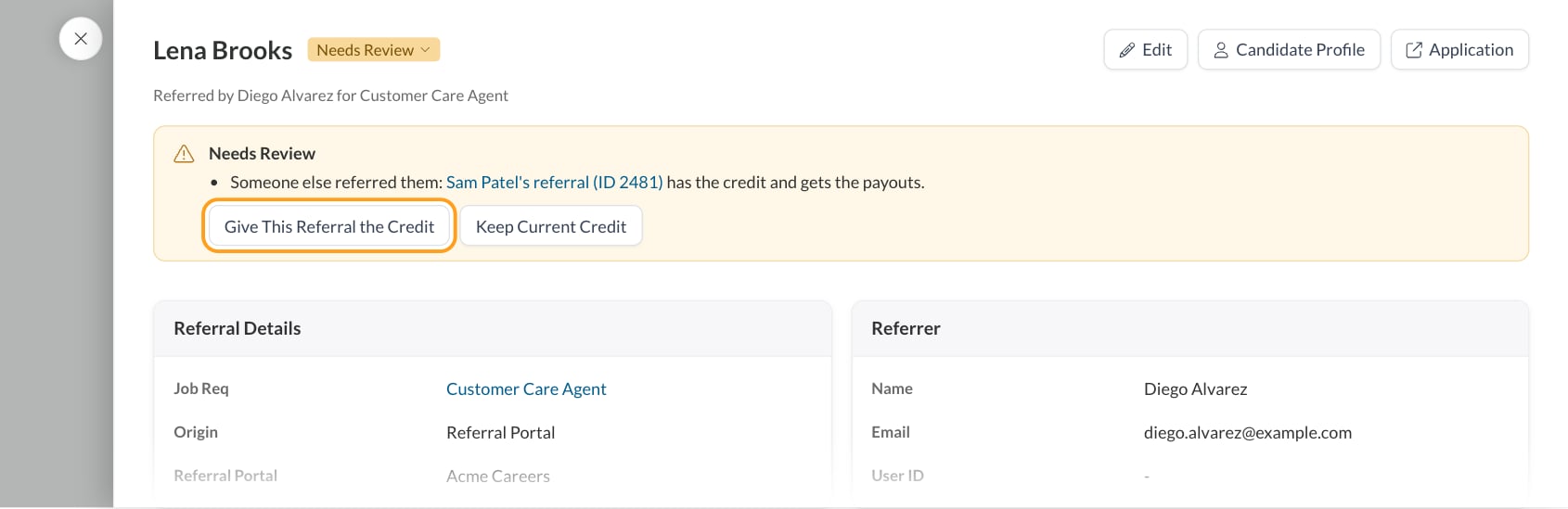
2
Decide
Choose one:
- Mark Reviewed: the referral counts as it is and becomes Active.
- Keep Current Credit (for a duplicate): this referral becomes Active, but the other referral keeps the credit, so this one’s payouts aren’t paid.
- Give This Referral the Credit (for a duplicate): this referral gets the credit and the payouts. The other referral’s payouts are no longer paid.
- Denied: change the status chip in the header to Denied so the referral doesn’t count.
Who gets the credit
When several employees refer the same person for the same application, only one referral is paid:- The first referral wins. Unless someone chooses otherwise, the earliest referral gets the credit.
- You can move the credit. Click Give This Referral the Credit on another referral of the same application. Every referral of that application is then marked reviewed.
- Credit can’t move once paid. If the other referral already has a paid payout, Journeyfront stops you, so the same hire is never paid twice.
- Denying passes the credit on. If you deny the referral that has the credit, the next referral in line gets it.
Change a referral’s status
With Manage Referrals, click the Status chip on the Referrals tab or in the referral’s header, then pick Active or Denied. The change saves right away.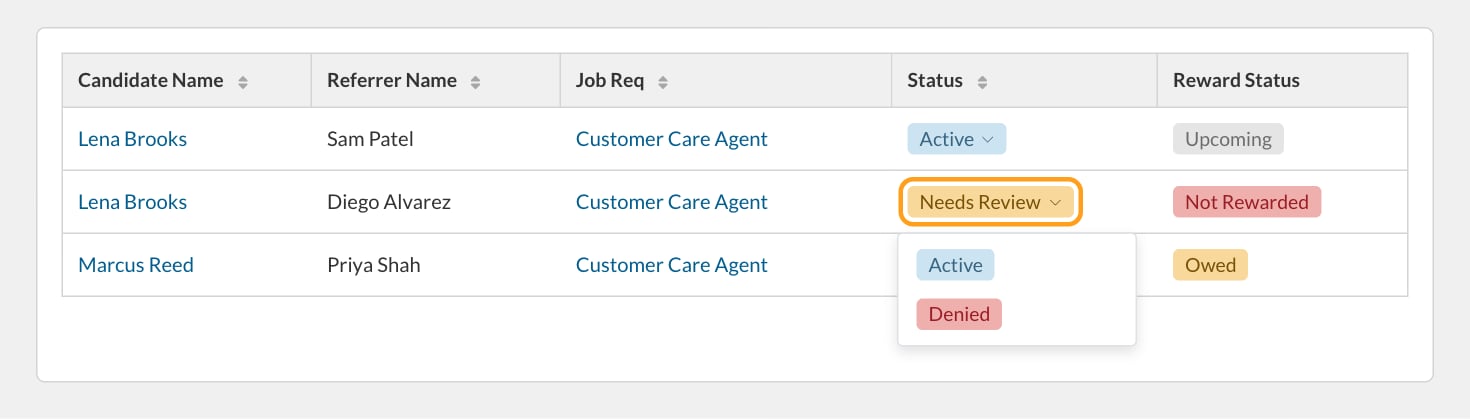
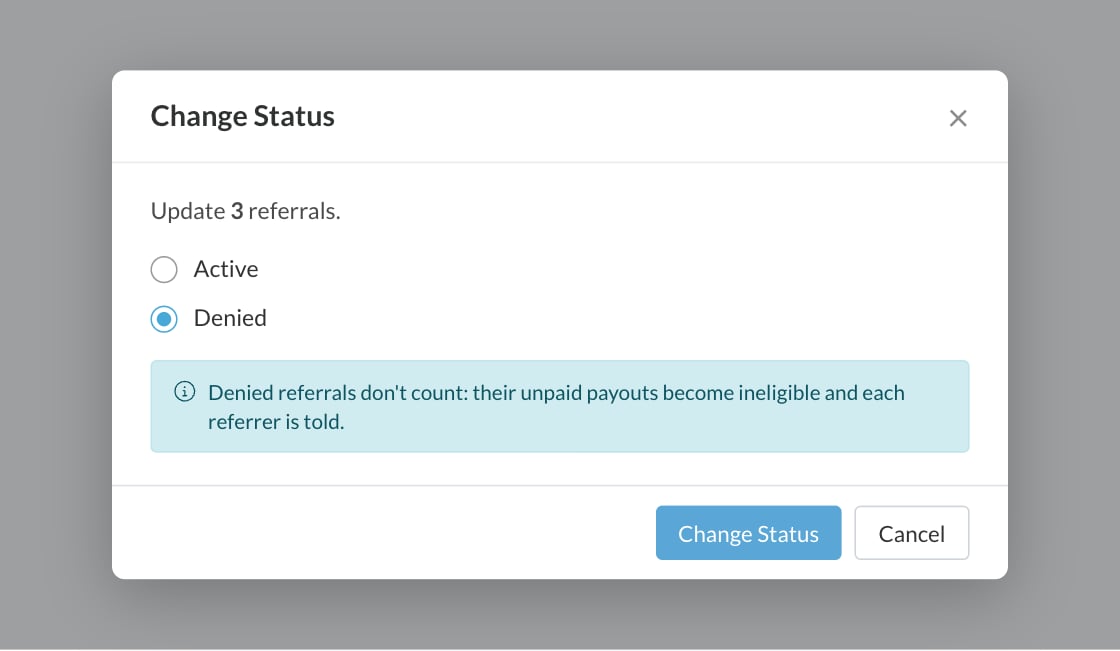
- Its unpaid payouts become Ineligible, with the reason Referral was denied. Payouts already paid stay paid.
- The referrer can get a Not Moving Forward email, depending on the portal’s and the employee’s notification settings. See Featured items and email notifications.
- If it had the credit, the credit passes to the next referral of the same application.
Reward Status
Reward Status shows what a referral has paid. Journeyfront works it out from the referral’s payouts, so you never set it yourself. It’s a column and a filter on the Referrals tab.
With Manage Referral Payouts, the Paid, Owed and Upcoming columns show the amounts behind the status. Owed means earned and overdue payouts that aren’t paid yet.
FAQ
Does Needs Review stop the referral from earning?
Does Needs Review stop the referral from earning?
No. Its payouts are still scheduled and can be earned, but they’re left out of payout batches until someone marks the referral reviewed, gives it the credit or denies it.
Why was a referral flagged when the candidate applied to a different job?
Why was a referral flagged when the candidate applied to a different job?
The candidate had an open application for another job before the referral was made. Applications that ended (not selected, withdrawn or hired) don’t count against a later referral for a different job.
I gave a referral the credit by mistake. Can I move it back?
I gave a referral the credit by mistake. Can I move it back?
Yes, as long as nothing has been paid on it. Open the other referral and click Give This Referral the Credit.
Why can't I move the credit?
Why can't I move the credit?
The referral that has the credit already has a paid payout. Moving the credit then would pay the same hire twice.
Can I set a referral to Needs Review myself?
Can I set a referral to Needs Review myself?
No. Needs Review only comes from Journeyfront’s checks. You can set Active or Denied.
Why does a referral show Not Rewarded when the hire is still here?
Why does a referral show Not Rewarded when the hire is still here?
Its payouts became ineligible, for example because another referral has the credit or the referrer left before a payout was earned. Open the referral and hover each payout’s status chip to see why.
Related
The Referrals page
Find, filter and manage every referral.
Referral details and milestones
See a referral’s reward and payouts.
Payouts
Every installment, its Earned On date and status.
Payout batches
Send what’s owed to payroll.