

Who can do this: Admins with Company Settings Access set up job boards and connect job board partners. Anyone who can edit a job req’s postings can post it through JobTarget.Availability: Posting through these partners costs nothing extra from Journeyfront. Paid placements, such as sponsored Indeed jobs, paid JobTarget boards and Appcast campaigns, are billed by the partner.
How your jobs get out
You can use all of these at once. One job board can go to Indeed, feed Appcast and have its postings promoted through JobTarget.
Start with a job posting
External boards can only show what your job postings contain, so get the posting right first:- The job board is turned on, with your branding. See Job boards.
- The job req has an active posting on that board, with Make job posting page active and Post job to job board set to Yes. See Job postings.
- The posting has a clear Job Title, a location with a country, and a description. JobTarget also needs a State/Region and Zip.
- Pay is filled in, with Show This Field on where pay must be shown. Partners that read your Feed URL receive the pay whether or not it’s shown on the posting.
Job postings
Create the posting each job board advertises, and choose where it’s listed.
Indeed
Turn on Post Jobs to Indeed for a job board and every active posting on it goes to Indeed as a free listing, kept in sync as you edit, deactivate or close jobs. You decide in your Indeed employer account whether to sponsor them. With Allow Indeed Easy Apply, candidates apply with a short form inside Indeed. Journeyfront then adds them to the job req, fills in their application with their Indeed answers and emails them a link to finish. With Easy Apply off, they click through to your Journeyfront posting and complete your full application there. See Indeed for setup and for choosing between the two.Indeed
Connect Indeed, choose between the two ways to apply, and check a posting’s sync.
JobTarget
JobTarget gives you a marketplace of more than 25,000 job boards, free and paid, including LinkedIn and niche, industry and diversity boards. Open a posting, click Post to Job Board under External Job Board Posts, then Job Post Using Job Target, and pick boards for that posting. JobTarget handles posting and billing. See JobTarget.JobTarget
Post a job to many boards at once and track spend, clicks and applicants.
Appcast
Appcast runs programmatic job advertising: it spreads your budget across job sites and adjusts where your jobs appear based on results. Appcast picks up your jobs from a job board’s Feed URL, and a tracking pixel on the candidate apply pages tells it which clicks turned into applications. See Appcast and Share a job feed.Appcast
Advertise your jobs through Appcast using your job feed.
Other job boards
For a board or site Journeyfront doesn’t connect to, post the job there yourself and use a magic link to the job posting as the apply link:- Make sure your account has a source for the board. Journeyfront includes default sources for many boards, such as ZipRecruiter, Glassdoor and SimplyHired. Add a custom source with the Job Board source type for any other. See Sources.
- Open the job req, go to Setup, then Job Postings, click the ⋮ menu on the posting, then Generate Source Link, and pick that source.
- Use the link as the apply link when you post the job.
How applicants come back
However they find the job, candidates end up in your Journeyfront application for the job req and appear on its Candidates tab like anyone else.
When a candidate came through a job posting, the Details tab of their Candidate Application also shows the Job Board and Job Post. To compare channels, use the Source Effectiveness dashboard. See Dashboards overview.
See where a posting has gone
Open the job req, go to Setup, then Job Postings, and open the posting. External Job Board Posts lists the partners the posting has been sent to, with each one’s status, such as Synced for Indeed.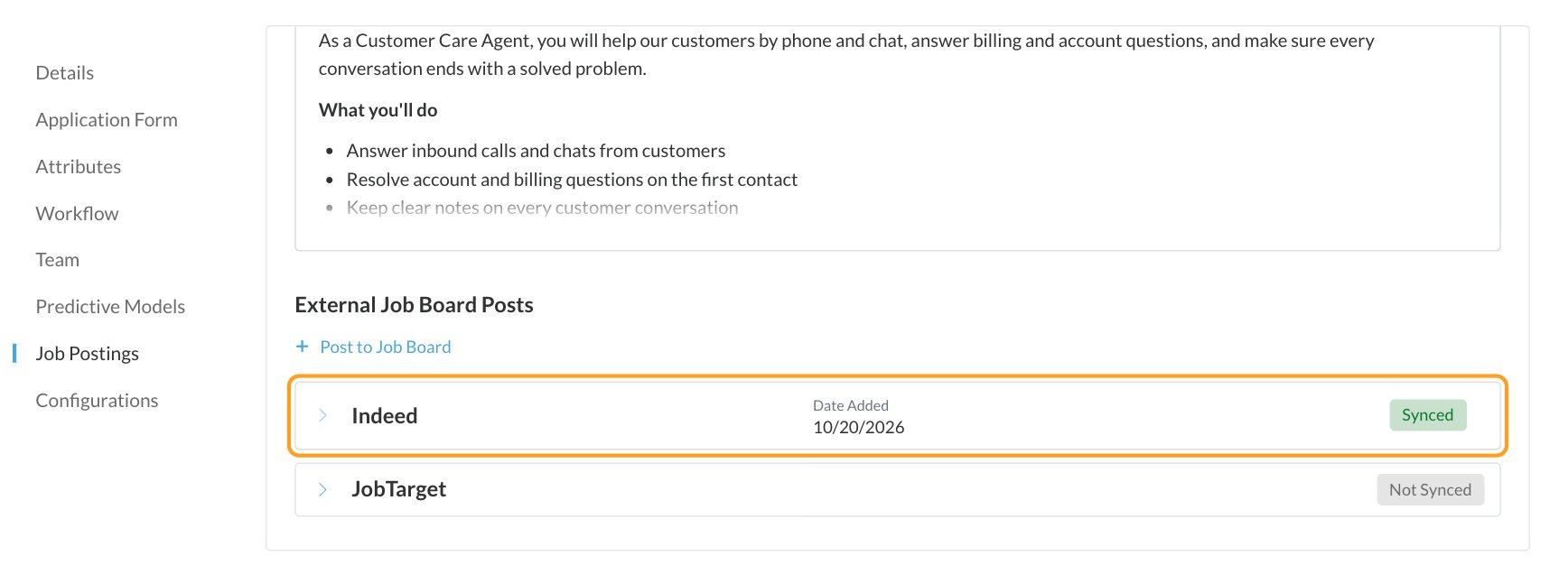
Take jobs down
Deactivating, closing or archiving a job req turns off its postings. That takes the job off your job board, expires it on Indeed and drops it from your Feed URL, so Appcast stops advertising it. JobTarget posts and jobs you posted yourself on other boards keep running until you end them there. See Job req statuses.FAQ
Can Journeyfront post to LinkedIn?
Can Journeyfront post to LinkedIn?
Yes, through JobTarget. Pick LinkedIn from the JobTarget marketplace for each posting you want there. Applicants get the source JobTarget via LinkedIn.
Do I need a separate job board for each partner?
Do I need a separate job board for each partner?
No. One job board can go to Indeed, feed Appcast and have its postings promoted through JobTarget, all at once. Use more than one job board when different audiences should see different jobs, for example one per country or brand.
Who bills for sponsored jobs and paid boards?
Who bills for sponsored jobs and paid boards?
The partner. Indeed, JobTarget and Appcast manage their own pricing, invoices and accounts. Journeyfront never stores your payment details for them.
Why doesn't my job show on Indeed yet?
Why doesn't my job show on Indeed yet?
Indeed can take up to 48 hours to show a new posting. Check the posting’s Indeed row under External Job Board Posts, and see Indeed for what to check if it isn’t syncing.
Can I post a job without listing it on our career site?
Can I post a job without listing it on our career site?
Yes. Set Post job to job board to No and keep Make job posting page active on. The posting isn’t listed on your job board, but anyone with its link can open it and apply, so you can share it on the boards you choose. See Job postings.
Related
Job board integrations
Compare Indeed, JobTarget and Appcast and set them up.
Job postings
Create the postings that go out to every board.
Job boards (career site)
Set up your job boards and their feeds.
Magic links
See which boards bring in your hires.