

Who can do this: Anyone who writes emails (Send Emails) or texts (Send Messages) can use variables. Editing templates needs Company Settings Access.
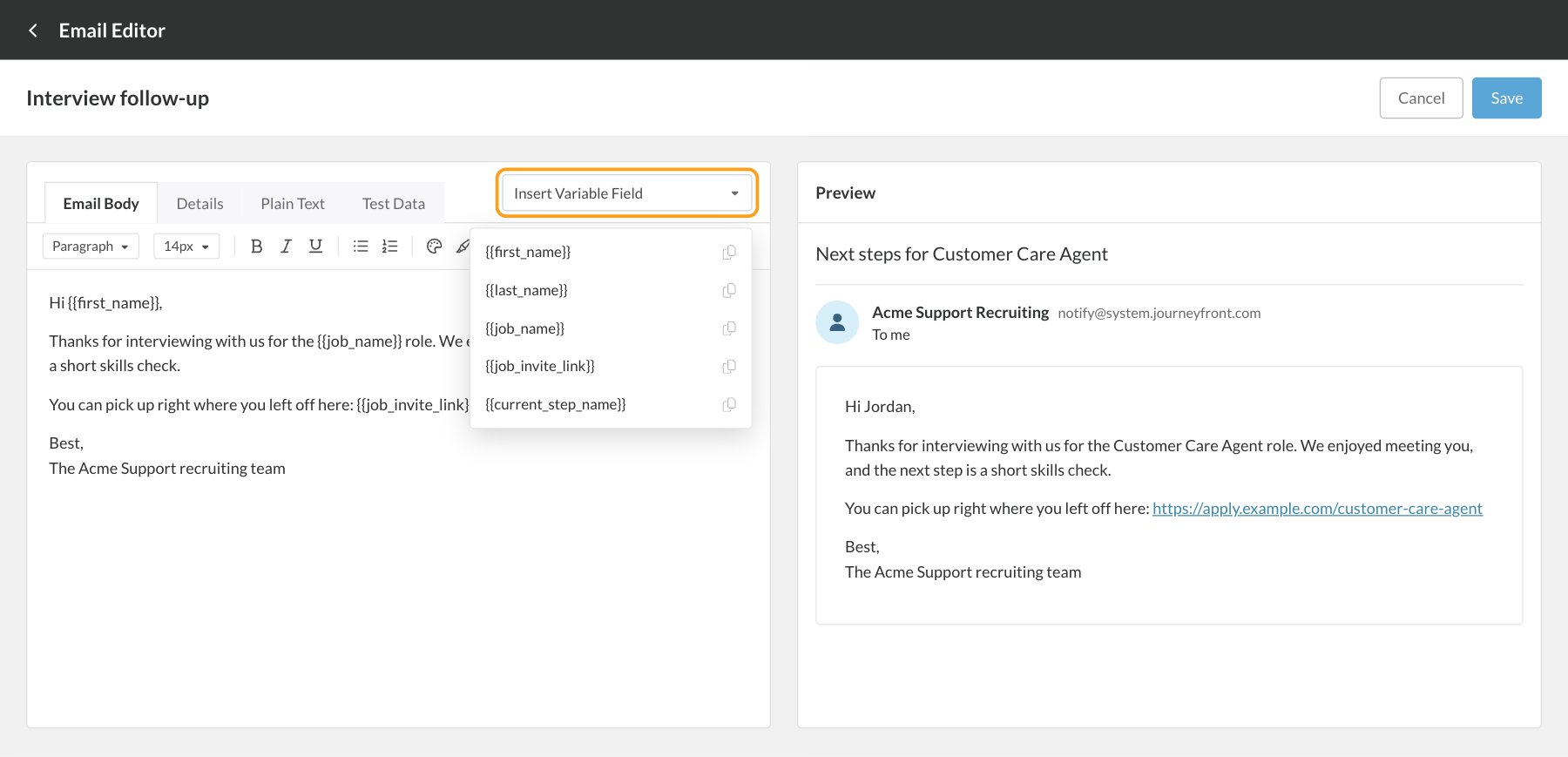
{{first_name}}. When an email or text goes out, Journeyfront replaces each one with that candidate’s details, so one template can greet hundreds of candidates by name and send each of them their own link.
Template variables are for emails and texts. Offer letters and documents use merge keys, like
{{SALARY}} or {{CANDIDATE_NAME}}, which are a separate list. See Offer fields and merge keys.How to add a variable
- Type it in double curly braces, exactly as it’s spelled below, in the subject or the body.
- Or click Insert Variable Field and choose a variable. It’s copied for you; paste it where you want it.
Team emails, texts and automations
These variables work in everything your team sends: emails from the Email window, team email templates, text message and WhatsApp templates, bulk messages, and the Send Email to Candidate and Send SMS to Candidate automation actions.{{company_name}} isn’t in the Insert Variable Field list, but it works the same way.
When you email or text candidates from different job reqs at once, each candidate’s {{job_name}}, {{job_invite_link}} and {{current_step_name}} come from their own job req.
WhatsApp templates use the same variables, which are turned into numbered placeholders when the template is submitted for approval. See WhatsApp.
System emails
Each system email has its own set of variables, which you’ll see in Insert Variable Field when you edit it. They’re filled in by Journeyfront from whatever triggered the email, so a variable from one system email won’t work in another, and the team email variables above don’t work in system emails.What each system email variable means
Add a fallback
If a candidate’s detail is empty, its variable is left blank. To show something else instead, add a fallback withdefault, the way Journeyfront’s own templates do:
FAQ
Why did a variable come out blank?
Why did a variable come out blank?
Either the candidate doesn’t have that detail, or the variable isn’t one that template supports, for example a team email variable in a system email. Check the spelling against the lists above, and add a fallback for details that can be empty.
Why does my email show {{first_name}} instead of a name?
Why does my email show {{first_name}} instead of a name?
In the editor’s Preview, variables stay as they are until you enter sample values on the Test Data tab. In a sent email they’re always filled in.
Can I use variables in the subject line?
Can I use variables in the subject line?
Yes, in team and system emails alike.
Can I use custom fields as variables?
Can I use custom fields as variables?
No. Emails and texts use the variables on this page. Custom fields can go into offer letters and documents as merge keys. See Offer fields and merge keys.
Is {{job_invite_link}} the same for every candidate?
Is {{job_invite_link}} the same for every candidate?
It points to the same job req’s application, set up for each candidate’s own email address. Send it to the candidate it’s meant for, not to a group.
Related
Email templates
Team emails and system emails.
Email candidates
Send emails one at a time or in bulk.
Message templates
Message templates for texts and WhatsApp.
Offer fields and merge keys
The placeholders for offer letters and documents.