Bundle an offer letter, supporting documents and default terms so every offer starts complete.
Who can do this: Admins with Company Settings Access, or users with the Offer Packages permission, build and edit packages. Choosing a job req’s package needs the Manage Job Req Settings permission.
An offer package is everything an offer starts from, saved once under a name: the offer letter, any supporting documents that go with it, and the default offer terms such as pay rate and schedule. Point a job req’s Offer activity or a hiring class at a package, and every offer from it starts pre-filled with the right letter, documents and terms. Recruiters only complete what’s specific to the candidate.
What’s in a package
Name and description: what your team sees when choosing a package. Candidates never see it.
Documents: any number of document templates, in the order the candidate should see them.
Offer defaults: starting values for any offer field. Any default can be locked so recruiters can’t change it.
A package needs at least an offer letter or one default value. Documents are optional.
Create an offer package
1
Start a new package
Go to Settings, then Offers, then Offer Packages, and click Create Package.
2
Name it
Enter a Name your team will recognize, for example “Day shift, hourly”, and an optional description of when to use it. Names must be unique in your account.
3
Choose the offer letter
Pick the letter template. A chip shows whether it includes an e-signature. You can preview it, or, with Company Settings Access, upload a new letter without leaving the page.
4
Add documents
Add any supporting documents in the order the candidate should see them. Each one shows whether it will be signed or is included for reference only. Use the arrows to reorder, preview any document, or, with Company Settings Access, upload a new one.
5
Fill in the offer defaults
Enter the terms every offer from this package should start with. Fields your letter or documents use are marked and listed first. Tick Recruiters can’t change this on any value that must stay fixed.
6
Read the setup check, then save
The Setup check shows every merge key in the letter and documents and where its value will come from. When it looks right, click Save.
Reading the setup check
Group
What it means
Filled automatically
Values Journeyfront fills in from the candidate, job req, hiring class, company or date.
Set by this package
Offer fields this package gives a default value. Locked values are marked.
Entered by the recruiter at offer time
Offer fields with no default. Recruiters are asked for these on every offer.
Not merge keys on this account
Keys in your files that Journeyfront doesn’t recognize, usually a typo.
E-signature
Which documents will be signed, and which are included for the candidate to read.
If a field shows under Entered by the recruiter at offer time but it’s the same for everyone who gets this package, give it a default. It moves to Set by this package, and recruiters stop retyping it. Anything under Not merge keys on this account needs fixing in the Word file, or a custom field with that key.
Duplicate a package
Most new packages are one small change away from an existing one, such as a new hiring class with a different pay rate.
On the Offer Packages page, open the row menu for the package you want to copy.
Click Duplicate Package. A copy named “Copy of” plus the original name opens in the editor, with the same letter, documents and defaults.
Rename it, change what’s different, and click Save.
Use a package on a job req
Each job req’s Offer activity points at a package.
1
Open the Offer activity
Go to the job req’s Setup, then Workflow, and click Create New Version (or Edit Draft if there’s already a draft, or Edit Scheduled Version for a scheduled one). Click the Offer activity to open its settings on the right. If the workflow doesn’t have one yet, drag Offer from the building blocks into the step where offers happen. See Build a workflow.
2
Choose the package
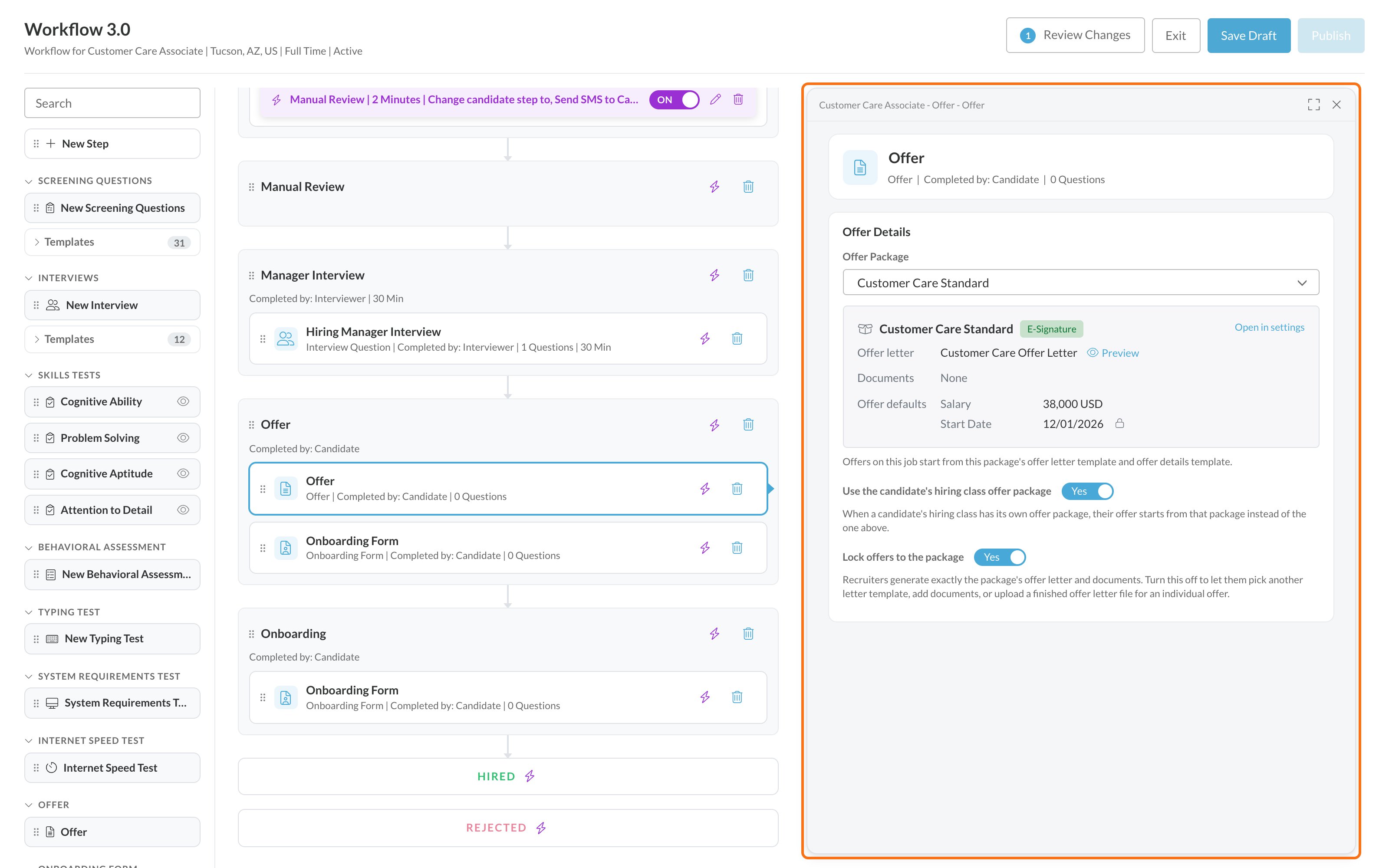
Under Offer Details, select the Offer Package. If you can view offers, a card below it shows what the package holds: its Offer letter, its Documents and its Offer defaults, so you can check it’s the right one without leaving the editor.
3
Decide how hiring classes work
Turn on Use the candidate’s hiring class offer package if a hiring class’s own package should replace the job req’s package for candidates in that class. It’s on by default for new Offer activities.
4
Decide how strict to be
Turn on Lock offers to the package to keep every offer on this activity to exactly this package’s letter and documents.
A candidate whose hiring class has a package gets that package. Everyone else gets the job req’s package.
Everyone gets the job req’s package.
Lock offers to the package
Recruiters can’t choose a different package, change the letter or documents, or upload their own letter.
Recruiters can choose a different package for an offer, and that choice is recorded on the offer.
Offer defaults that aren’t locked can still be edited per candidate either way.
Some accounts also see a Reminders section here, with Auto reminders that email signers until they sign or decline. It depends on your e-signature setup and isn’t available on every account.
Use a package on a hiring class
Give a hiring class its own package when its candidates need different terms or documents from the rest of the job req. See Hiring classes.
On the job req’s Hiring Classes tab, edit a class or create a new one.
In Offer Package, search for and select the package. The first option, Use the job’s offer package, means the class doesn’t override the job req.
If you have the Offer Packages permission or Company Settings Access, the package’s letter, documents and offer defaults appear under the picker, so you can check it’s the right one.
Save the class.
The class’s package is only used when the job req’s Offer activity has Use the candidate’s hiring class offer package turned on.
Which package an offer starts from
When someone sends an offer, Journeyfront picks the package in this order:
The candidate’s hiring class package, if they’re in a class that has one and the Offer activity allows it.
Otherwise, the package on the job req’s Offer activity.
If the activity isn’t locked, the recruiter can choose a different package for that one offer.
The offer always shows which package it started from: “from the candidate’s hiring class”, “from this job’s Offer activity” or “chosen for this offer”.
See where a package is used
The Used By column counts the job reqs and hiring classes pointing at each package. Click it to see the list, with a link to each one. You can’t delete a package while anything uses it.
FAQ
If I change a package, do existing offers change?
No. Changes apply to new offers only. Offers that were already created keep the letter, documents and terms they started with.
Who can see what's inside a package?
Anyone on your account can see package names, which is enough to choose one for a hiring class. Seeing the letter, documents and default terms (including pay) needs the Offer Packages permission or Company Settings Access.
Can recruiters change a locked default?
No. A value marked Recruiters can’t change this is fixed on every offer from the package. Only someone who can edit the package can change or unlock it.
A hiring class has a package and the job req has a different one. Which is used?
The hiring class package, as long as the Offer activity has Use the candidate’s hiring class offer package turned on. Otherwise the job req’s package is used.
Where did Offer Details Templates go?
Default offer terms now live on the offer package, next to the letter and documents. Existing setups were converted automatically: each Offer activity points at a package with the same letter and terms it had before, so nothing changed on your job reqs. You may want to rename those packages to something your team will recognize.
Can I delete a package?
Only when no job req or hiring class uses it. Used By shows exactly which ones do, so you can point them at another package first.
Can the Offer Packages permission change templates?
No. It lets people build and edit packages, and see the templates and fields a package needs. Uploading or changing templates and offer fields needs Company Settings Access.
Related
Offer letter and document templates
The files a package is made of.
Offer fields and merge keys
The terms a package’s defaults are made of.
Send offers in bulk
Send a whole hiring class its offers at once.
Hiring classes
Group hires who start and train together.
Was this page helpful?
{"docsConfig":{"theme":"mint","$schema":"https://mintlify.com/docs.json","name":"Journeyfront Help Center","description":"Guides, training and reference for hiring teams using Journeyfront.","colors":{"primary":"#0072D5","light":"#2AA8F2","dark":"#005AAB"},"logo":{"light":"https://mintcdn.com/journeyfront/Ki8OScNKQAoeTHdj/logo/light.svg?fit=max\u0026auto=format\u0026n=Ki8OScNKQAoeTHdj\u0026q=85\u0026s=b9cfa7f80c1e8537f151a84523c25a55","dark":"https://mintcdn.com/journeyfront/Ki8OScNKQAoeTHdj/logo/dark.svg?fit=max\u0026auto=format\u0026n=Ki8OScNKQAoeTHdj\u0026q=85\u0026s=47fd011873279dbf753d972cb3f36612"},"favicon":"https://mintcdn.com/journeyfront/61dBaB1hIRAsZpUl/favicon.svg?fit=max\u0026auto=format\u0026n=61dBaB1hIRAsZpUl\u0026q=85\u0026s=f02b5a6171cc5402119cd1ee0eb6d6c9","background":{"color":{"light":"#FFFFFF","dark":"#1F2935"}},"navbar":{"links":[{"href":"https://www.journeyfront.com/contact","label":"Contact support"},{"href":"https://www.journeyfront.com/office-hours","label":"Office hours"}],"primary":{"type":"button","label":"Log in to Journeyfront","href":"https://app.journeyfront.com"}},"footer":{"socials":{"linkedin":"https://www.linkedin.com/company/journeyfront","website":"https://www.journeyfront.com"}},"fonts":{"heading":{"family":"Plus Jakarta Sans","weight":700},"body":{"family":"Lato"}},"errors":{"404":{"redirect":true}},"contextual":{"options":["copy","view","chatgpt","claude","mcp","add-mcp"],"display":"header"},"markdown":{"instructions":"This is the Journeyfront Help Center for hiring teams. Journeyfront is an applicant tracking system (ATS). Use the Help Center's terms: job req, Candidate Profile (the person), Candidate Application (one person on one job req), hiring class. Link to the article you used in your answer."},"styling":{"latex":false},"navigation":{"pages":[]}},"deployment":{"deploymentMetadataValue":{"subdomain":"journeyfront","hasAudioNarration":false,"actualSubdomain":"journeyfront","customDomains":["help.journeyfront.com"],"gitSource":{"type":"github","owner":"journeyfront","repo":"help-center","deployBranch":"main","contentDirectory":"","isPrivate":true,"mountPath":"","label":"","_id":"6ad91d0df5684d6fcb2bcfab"},"feedback":{"thumbs":true},"entitlements":{"AI_CHAT":{"status":"DISABLED"},"WEB_MCP":{"status":"DISABLED"},"NARRATION":{"status":"DISABLED"}},"buildId":"6b008aa363864491a045460e","clientVersion":"0.0.4248","searchFilterCounts":[{"language":"default","tag":"Knowledge Base","count":159},{"language":"default","tag":"Candidates","count":27},{"language":"default","tag":"Source and Attract Candidates","count":26},{"language":"default","tag":"Referrals","count":16},{"language":"default","tag":"Integrations","count":14},{"language":"default","tag":"Offer \u0026 Hire","count":13},{"language":"default","tag":"Email \u0026 Texting","count":12},{"language":"default","tag":"Reporting \u0026 Analytics","count":12},{"language":"default","tag":"Interviews \u0026 Scheduling","count":10},{"language":"default","tag":"Assessments","count":8}],"searchSettings":{"maxResults":10,"showContentSnippets":true,"fullPageSearch":true}},"assistantConfig":{"enableAskAiButton":false,"enableStarterQuestions":false,"enableContextualStarterQuestions":false,"enableAskAiSearchBar":true},"basePath":"","hasChatPermissions":false,"hasWebMcpPermissions":false,"toggles":[{"name":"kill-isr","enabled":true,"variant":{"name":"disabled","enabled":false,"feature_enabled":true},"impressionData":false},{"name":"custom-rbac-roles","enabled":true,"variant":{"name":"disabled","enabled":false,"feature_enabled":true},"impressionData":false},{"name":"agent-mintlify-slack","enabled":true,"variant":{"name":"disabled","enabled":false,"feature_enabled":true},"impressionData":false},{"name":"agent-integrations-settings","enabled":true,"variant":{"name":"disabled","enabled":false,"feature_enabled":true},"impressionData":false},{"name":"rbac-expansion","enabled":true,"variant":{"name":"disabled","enabled":false,"feature_enabled":true},"impressionData":false},{"name":"automations-pr-grouping","enabled":true,"variant":{"name":"disabled","enabled":false,"feature_enabled":true},"impressionData":false},{"name":"custom-prefix","enabled":true,"variant":{"name":"disabled","enabled":false,"feature_enabled":true},"impressionData":false},{"name":"analytics-v7","enabled":true,"variant":{"name":"disabled","enabled":false,"feature_enabled":true},"impressionData":false},{"name":"user-flows-analytics","enabled":true,"variant":{"name":"disabled","enabled":false,"feature_enabled":true},"impressionData":false},{"name":"no-publish-flow","enabled":true,"variant":{"name":"disabled","enabled":false,"feature_enabled":true},"impressionData":false},{"name":"workos-onboarding","enabled":true,"variant":{"name":"disabled","enabled":false,"feature_enabled":true},"impressionData":false},{"name":"snapshot-serving-live","enabled":true,"variant":{"name":"disabled","enabled":false,"feature_enabled":true},"impressionData":false},{"name":"stripTemperatureMiddleware","enabled":true,"variant":{"name":"disabled","enabled":false,"feature_enabled":true},"impressionData":false},{"name":"support-platform-pylon-zendesk","enabled":true,"variant":{"name":"disabled","enabled":false,"feature_enabled":true},"impressionData":false},{"name":"snapshot-serving","enabled":true,"variant":{"name":"disabled","enabled":false,"feature_enabled":true},"impressionData":false},{"name":"instant-rollback","enabled":true,"variant":{"name":"disabled","enabled":false,"feature_enabled":true},"impressionData":false},{"name":"granular-notifications-server","enabled":true,"variant":{"name":"disabled","enabled":false,"feature_enabled":true},"impressionData":false},{"name":"granular-notifications","enabled":true,"variant":{"name":"disabled","enabled":false,"feature_enabled":true},"impressionData":false},{"name":"automations-fable","enabled":true,"variant":{"name":"disabled","enabled":false,"feature_enabled":true},"impressionData":false},{"name":"fixed-ai-action-pricing","enabled":true,"variant":{"name":"disabled","enabled":false,"feature_enabled":true},"impressionData":false},{"name":"site-roles","enabled":true,"variant":{"name":"disabled","enabled":false,"feature_enabled":true},"impressionData":false},{"name":"automation-resolve-merge-conflict","enabled":true,"variant":{"name":"disabled","enabled":false,"feature_enabled":true},"impressionData":false},{"name":"scoped-publishing","enabled":true,"variant":{"name":"disabled","enabled":false,"feature_enabled":true},"impressionData":false},{"name":"mintql","enabled":true,"variant":{"name":"disabled","enabled":false,"feature_enabled":true},"impressionData":false},{"name":"page-level-analytics","enabled":true,"variant":{"name":"disabled","enabled":false,"feature_enabled":true},"impressionData":false},{"name":"editor-version-history-v2","enabled":true,"variant":{"name":"disabled","enabled":false,"feature_enabled":true},"impressionData":false},{"name":"billing-page-v2","enabled":true,"variant":{"name":"disabled","enabled":false,"feature_enabled":true},"impressionData":false},{"name":"full-page-search","enabled":true,"variant":{"name":"disabled","enabled":false,"feature_enabled":true},"impressionData":false},{"name":"workspace-projects","enabled":true,"variant":{"name":"disabled","enabled":false,"feature_enabled":true},"impressionData":false},{"name":"assistant-v5","enabled":true,"variant":{"name":"disabled","enabled":false,"feature_enabled":true},"impressionData":false},{"name":"fork-pr-previews","enabled":true,"variant":{"name":"disabled","enabled":false,"feature_enabled":true},"impressionData":false},{"name":"revalidation-jwt","enabled":true,"variant":{"name":"disabled","enabled":false,"feature_enabled":true},"impressionData":false},{"name":"workos-sso-scim","enabled":true,"variant":{"name":"disabled","enabled":false,"feature_enabled":true},"impressionData":false},{"name":"hobby-abuse-scan","enabled":true,"variant":{"name":"disabled","enabled":false,"feature_enabled":true},"impressionData":false},{"name":"dashboard-inbox","enabled":true,"variant":{"name":"disabled","enabled":false,"feature_enabled":true},"impressionData":false},{"name":"workos-signup","enabled":true,"variant":{"name":"disabled","enabled":false,"feature_enabled":true},"impressionData":false},{"name":"turbopuffer-dual-write","enabled":true,"variant":{"name":"disabled","enabled":false,"feature_enabled":true},"impressionData":false},{"name":"workos-enabled","enabled":true,"variant":{"name":"disabled","enabled":false,"feature_enabled":true},"impressionData":false},{"name":"approve-review-flow","enabled":true,"variant":{"name":"disabled","enabled":false,"feature_enabled":true},"impressionData":false},{"name":"editor-metadata","enabled":true,"variant":{"name":"disabled","enabled":false,"feature_enabled":true},"impressionData":false},{"name":"sso-setup-deadline-banner","enabled":true,"variant":{"name":"disabled","enabled":false,"feature_enabled":true},"impressionData":false},{"name":"turbopuffer-serve","enabled":true,"variant":{"name":"disabled","enabled":false,"feature_enabled":true},"impressionData":false},{"name":"live-agents","enabled":true,"variant":{"name":"disabled","enabled":false,"feature_enabled":true},"impressionData":false},{"name":"starter-pricing","enabled":true,"variant":{"name":"treatment","enabled":true,"payload":{"type":"string","value":"treatment"},"feature_enabled":true},"impressionData":false},{"name":"llms-txt-v2","enabled":true,"variant":{"name":"disabled","enabled":false,"feature_enabled":true},"impressionData":false},{"name":"wildcard-email-auth","enabled":true,"variant":{"name":"disabled","enabled":false,"feature_enabled":true},"impressionData":false}],"googleFontsInlined":true},"customCss":[]}
{"page":{"pagePath":"offers/offer-packages","slug":"/offers/offer-packages","pageMetadata":{"title":"Offer packages","description":"Bundle an offer letter, supporting documents and default terms so every offer starts complete.","href":"/offers/offer-packages"},"description":{"compiledSource":"\"use strict\";\nconst {jsx: _jsx} = arguments[0];\nconst {useMDXComponents: _provideComponents} = arguments[0];\nfunction _createMdxContent(props) {\n const _components = {\n p: \"p\",\n ..._provideComponents(),\n ...props.components\n };\n return _jsx(_components.p, {\n children: \"Bundle an offer letter, supporting documents and default terms so every offer starts complete.\"\n });\n}\nfunction MDXContent(props = {}) {\n const {wrapper: MDXLayout} = {\n ..._provideComponents(),\n ...props.components\n };\n return MDXLayout ? _jsx(MDXLayout, {\n ...props,\n children: _jsx(_createMdxContent, {\n ...props\n })\n }) : _createMdxContent(props);\n}\nreturn {\n default: MDXContent\n};\n","frontmatter":{},"scope":{}},"pageType":"default","mdx":{"mdxSource":{"compiledSource":"\"use strict\";const{Fragment:_Fragment,jsx:_jsx,jsxs:_jsxs}=arguments[0];const{useMDXComponents:_provideComponents}=arguments[0];function _createMdxContent(props){const _components={a:`a`,em:`em`,li:`li`,ol:`ol`,p:`p`,strong:`strong`,tbody:`tbody`,td:`td`,th:`th`,thead:`thead`,tr:`tr`,ul:`ul`,..._provideComponents(),...props.components},{Accordion,AccordionGroup,Card,Columns,Frame,Heading,Info,Note,OptimizedFrame,OptimizedImage,Step,Steps,Table,Tip}=_components;if(!Accordion)_missingMdxReference(`Accordion`,true);if(!AccordionGroup)_missingMdxReference(`AccordionGroup`,true);if(!Card)_missingMdxReference(`Card`,true);if(!Columns)_missingMdxReference(`Columns`,true);if(!Frame)_missingMdxReference(`Frame`,true);if(!Heading)_missingMdxReference(`Heading`,true);if(!Info)_missingMdxReference(`Info`,true);if(!Note)_missingMdxReference(`Note`,true);if(!OptimizedFrame)_missingMdxReference(`OptimizedFrame`,true);if(!OptimizedImage)_missingMdxReference(`OptimizedImage`,true);if(!Step)_missingMdxReference(`Step`,true);if(!Steps)_missingMdxReference(`Steps`,true);if(!Table)_missingMdxReference(`Table`,true);if(!Tip)_missingMdxReference(`Tip`,true);return _jsxs(_Fragment,{children:[_jsx(Info,{children:_jsxs(_components.p,{children:[_jsx(_components.strong,{children:`Who can do this:`}),` Admins with `,_jsx(_components.em,{children:`Company Settings Access`}),`, or users with the `,_jsx(_components.em,{children:`Offer Packages`}),` permission, build and edit packages. Choosing a job req’s package needs the `,_jsx(_components.em,{children:`Manage Job Req Settings`}),` permission.`]})}),`\n`,_jsx(OptimizedFrame,{src:`https://www.youtube.com/embed/4jFXrUc_UwQ`,title:`Offer packages`,frameborder:`0`,className:`mint-w-full mint-aspect-video mint-rounded-xl`,allow:`accelerometer; autoplay; clipboard-write; encrypted-media; gyroscope; picture-in-picture; web-share`,allowfullscreen:true}),`\n`,_jsx(_components.p,{children:`An offer package is everything an offer starts from, saved once under a name: the offer letter, any supporting documents that go with it, and the default offer terms such as pay rate and schedule. Point a job req’s Offer activity or a hiring class at a package, and every offer from it starts pre-filled with the right letter, documents and terms. Recruiters only complete what’s specific to the candidate.`}),`\n`,_jsx(Heading,{level:`2`,id:`what’s-in-a-package`,children:`What’s in a package`}),`\n`,_jsxs(_components.ul,{children:[`\n`,_jsxs(_components.li,{children:[_jsx(_components.strong,{children:`Name and description:`}),` what your team sees when choosing a package. Candidates never see it.`]}),`\n`,_jsxs(_components.li,{children:[_jsx(_components.strong,{children:`Offer letter:`}),` one `,_jsx(_components.a,{href:`/offers/templates`,children:`offer letter template`}),`.`]}),`\n`,_jsxs(_components.li,{children:[_jsx(_components.strong,{children:`Documents:`}),` any number of `,_jsx(_components.a,{href:`/offers/templates`,children:`document templates`}),`, in the order the candidate should see them.`]}),`\n`,_jsxs(_components.li,{children:[_jsx(_components.strong,{children:`Offer defaults:`}),` starting values for any `,_jsx(_components.a,{href:`/offers/offer-fields`,children:`offer field`}),`. Any default can be locked so recruiters can’t change it.`]}),`\n`]}),`\n`,_jsx(_components.p,{children:`A package needs at least an offer letter or one default value. Documents are optional.`}),`\n`,_jsx(Heading,{level:`2`,id:`create-an-offer-package`,children:`Create an offer package`}),`\n`,_jsxs(Steps,{children:[_jsx(Step,{title:`Start a new package`,children:_jsxs(_components.p,{children:[`Go to `,_jsx(_components.strong,{children:`Settings`}),`, then `,_jsx(_components.strong,{children:`Offers`}),`, then `,_jsx(_components.strong,{children:`Offer Packages`}),`, and click `,_jsx(_components.strong,{children:`Create Package`}),`.`]})}),_jsx(Step,{title:`Name it`,children:_jsxs(_components.p,{children:[`Enter a `,_jsx(_components.strong,{children:`Name`}),` your team will recognize, for example “Day shift, hourly”, and an optional description of when to use it. Names must be unique in your account.`]})}),_jsx(Step,{title:`Choose the offer letter`,children:_jsxs(_components.p,{children:[`Pick the letter template. A chip shows whether it includes an e-signature. You can preview it, or, with `,_jsx(_components.em,{children:`Company Settings Access`}),`, upload a new letter without leaving the page.`]})}),_jsx(Step,{title:`Add documents`,children:_jsxs(_components.p,{children:[`Add any supporting documents in the order the candidate should see them. Each one shows whether it will be signed or is included for reference only. Use the arrows to reorder, preview any document, or, with `,_jsx(_components.em,{children:`Company Settings Access`}),`, upload a new one.`]})}),_jsx(Step,{title:`Fill in the offer defaults`,children:_jsxs(_components.p,{children:[`Enter the terms every offer from this package should start with. Fields your letter or documents use are marked and listed first. Tick `,_jsx(_components.strong,{children:`Recruiters can’t change this`}),` on any value that must stay fixed.`]})}),_jsx(Step,{title:`Read the setup check, then save`,children:_jsxs(_components.p,{children:[`The `,_jsx(_components.strong,{children:`Setup check`}),` shows every merge key in the letter and documents and where its value will come from. When it looks right, click `,_jsx(_components.strong,{children:`Save`}),`.`]})})]}),`\n`,_jsx(Frame,{children:_jsx(OptimizedImage,{src:`https://mintcdn.com/journeyfront/GQjKlyAQmW_Mi7NI/images/offers/offer-packages/gen-create-offer-package.png?fit=max\u0026auto=format\u0026n=GQjKlyAQmW_Mi7NI\u0026q=85\u0026s=2b66e228168842219d48107bd79e5457`,alt:`The Create Offer Package page with the name Day shift, hourly, an offer letter with e-signature, an NDA and a benefits guide as documents, offer defaults with Salary locked so recruiters can't change it, and the setup check`,\"data-og-width\":`1656`,width:`1656`,\"data-og-height\":`2421`,height:`2421`,\"data-path\":`images/offers/offer-packages/gen-create-offer-package.png`,\"data-optimize\":`true`,\"data-opv\":`3`,srcset:`https://mintcdn.com/journeyfront/GQjKlyAQmW_Mi7NI/images/offers/offer-packages/gen-create-offer-package.png?w=280\u0026fit=max\u0026auto=format\u0026n=GQjKlyAQmW_Mi7NI\u0026q=85\u0026s=34b0c6b0f1b350aa53950bbce5e20f78 280w, https://mintcdn.com/journeyfront/GQjKlyAQmW_Mi7NI/images/offers/offer-packages/gen-create-offer-package.png?w=560\u0026fit=max\u0026auto=format\u0026n=GQjKlyAQmW_Mi7NI\u0026q=85\u0026s=13a7e379f5f713bfa7aa2f414de3cfdf 560w, https://mintcdn.com/journeyfront/GQjKlyAQmW_Mi7NI/images/offers/offer-packages/gen-create-offer-package.png?w=840\u0026fit=max\u0026auto=format\u0026n=GQjKlyAQmW_Mi7NI\u0026q=85\u0026s=cf02561551a80d4a18b7c89290eb177b 840w, https://mintcdn.com/journeyfront/GQjKlyAQmW_Mi7NI/images/offers/offer-packages/gen-create-offer-package.png?w=1100\u0026fit=max\u0026auto=format\u0026n=GQjKlyAQmW_Mi7NI\u0026q=85\u0026s=91e74c1541a6febb51fa107f24750f16 1100w, https://mintcdn.com/journeyfront/GQjKlyAQmW_Mi7NI/images/offers/offer-packages/gen-create-offer-package.png?w=1650\u0026fit=max\u0026auto=format\u0026n=GQjKlyAQmW_Mi7NI\u0026q=85\u0026s=894ff0fd008bea91e65e51b46b7af7a1 1650w, https://mintcdn.com/journeyfront/GQjKlyAQmW_Mi7NI/images/offers/offer-packages/gen-create-offer-package.png?w=2500\u0026fit=max\u0026auto=format\u0026n=GQjKlyAQmW_Mi7NI\u0026q=85\u0026s=e7fcf62807cffd2474c6e9f58c3e9e71 2500w`})}),`\n`,_jsx(Heading,{level:`3`,id:`reading-the-setup-check`,children:`Reading the setup check`}),`\n`,_jsxs(Table,{children:[_jsx(_components.thead,{children:_jsxs(_components.tr,{children:[_jsx(_components.th,{children:`Group`}),_jsx(_components.th,{children:`What it means`})]})}),_jsxs(_components.tbody,{children:[_jsxs(_components.tr,{children:[_jsx(_components.td,{children:_jsx(_components.strong,{children:`Filled automatically`})}),_jsx(_components.td,{children:`Values Journeyfront fills in from the candidate, job req, hiring class, company or date.`})]}),_jsxs(_components.tr,{children:[_jsx(_components.td,{children:_jsx(_components.strong,{children:`Set by this package`})}),_jsx(_components.td,{children:`Offer fields this package gives a default value. Locked values are marked.`})]}),_jsxs(_components.tr,{children:[_jsx(_components.td,{children:_jsx(_components.strong,{children:`Entered by the recruiter at offer time`})}),_jsx(_components.td,{children:`Offer fields with no default. Recruiters are asked for these on every offer.`})]}),_jsxs(_components.tr,{children:[_jsx(_components.td,{children:_jsx(_components.strong,{children:`Not merge keys on this account`})}),_jsx(_components.td,{children:`Keys in your files that Journeyfront doesn’t recognize, usually a typo.`})]}),_jsxs(_components.tr,{children:[_jsx(_components.td,{children:_jsx(_components.strong,{children:`E-signature`})}),_jsx(_components.td,{children:`Which documents will be signed, and which are included for the candidate to read.`})]})]})]}),`\n`,_jsx(Tip,{children:_jsxs(_components.p,{children:[`If a field shows under `,_jsx(_components.strong,{children:`Entered by the recruiter at offer time`}),` but it’s the same for everyone who gets this package, give it a default. It moves to `,_jsx(_components.strong,{children:`Set by this package`}),`, and recruiters stop retyping it. Anything under `,_jsx(_components.strong,{children:`Not merge keys on this account`}),` needs fixing in the Word file, or a custom field with that key.`]})}),`\n`,_jsx(Heading,{level:`2`,id:`duplicate-a-package`,children:`Duplicate a package`}),`\n`,_jsx(_components.p,{children:`Most new packages are one small change away from an existing one, such as a new hiring class with a different pay rate.`}),`\n`,_jsxs(_components.ol,{children:[`\n`,_jsxs(_components.li,{children:[`On the `,_jsx(_components.strong,{children:`Offer Packages`}),` page, open the row menu for the package you want to copy.`]}),`\n`,_jsxs(_components.li,{children:[`Click `,_jsx(_components.strong,{children:`Duplicate Package`}),`. A copy named “Copy of” plus the original name opens in the editor, with the same letter, documents and defaults.`]}),`\n`,_jsxs(_components.li,{children:[`Rename it, change what’s different, and click `,_jsx(_components.strong,{children:`Save`}),`.`]}),`\n`]}),`\n`,_jsx(Heading,{level:`2`,id:`use-a-package-on-a-job-req`,children:`Use a package on a job req`}),`\n`,_jsx(_components.p,{children:`Each job req’s Offer activity points at a package.`}),`\n`,_jsxs(Steps,{children:[_jsx(Step,{title:`Open the Offer activity`,children:_jsxs(_components.p,{children:[`Go to the job req’s `,_jsx(_components.strong,{children:`Setup`}),`, then `,_jsx(_components.strong,{children:`Workflow`}),`, and click `,_jsx(_components.strong,{children:`Create New Version`}),` (or `,_jsx(_components.strong,{children:`Edit Draft`}),` if there’s already a draft, or `,_jsx(_components.strong,{children:`Edit Scheduled Version`}),` for a scheduled one). Click the Offer activity to open its settings on the right. If the workflow doesn’t have one yet, drag `,_jsx(_components.strong,{children:`Offer`}),` from the building blocks into the step where offers happen. See `,_jsx(_components.a,{href:`/workflows/build`,children:`Build a workflow`}),`.`]})}),_jsx(Step,{title:`Choose the package`,children:_jsxs(_components.p,{children:[`Under `,_jsx(_components.strong,{children:`Offer Details`}),`, select the `,_jsx(_components.strong,{children:`Offer Package`}),`. If you can view offers, a card below it shows what the package holds: its `,_jsx(_components.strong,{children:`Offer letter`}),`, its `,_jsx(_components.strong,{children:`Documents`}),` and its `,_jsx(_components.strong,{children:`Offer defaults`}),`, so you can check it’s the right one without leaving the editor.`]})}),_jsx(Step,{title:`Decide how hiring classes work`,children:_jsxs(_components.p,{children:[`Turn on `,_jsx(_components.strong,{children:`Use the candidate’s hiring class offer package`}),` if a hiring class’s own package should replace the job req’s package for candidates in that class. It’s on by default for new Offer activities.`]})}),_jsx(Step,{title:`Decide how strict to be`,children:_jsxs(_components.p,{children:[`Turn on `,_jsx(_components.strong,{children:`Lock offers to the package`}),` to keep every offer on this activity to exactly this package’s letter and documents.`]})}),_jsx(Step,{title:`Save and publish`,children:_jsxs(_components.p,{children:[`Click `,_jsx(_components.strong,{children:`Save Draft`}),`, then `,_jsx(_components.strong,{children:`Publish`}),` so offers use the package. See `,_jsx(_components.a,{href:`/workflows/publish`,children:`Publish workflow changes`}),`.`]})})]}),`\n`,_jsxs(Table,{children:[_jsx(_components.thead,{children:_jsxs(_components.tr,{children:[_jsx(_components.th,{children:`Setting`}),_jsx(_components.th,{children:`When it’s on`}),_jsx(_components.th,{children:`When it’s off`})]})}),_jsxs(_components.tbody,{children:[_jsxs(_components.tr,{children:[_jsx(_components.td,{children:_jsx(_components.strong,{children:`Use the candidate’s hiring class offer package`})}),_jsx(_components.td,{children:`A candidate whose hiring class has a package gets that package. Everyone else gets the job req’s package.`}),_jsx(_components.td,{children:`Everyone gets the job req’s package.`})]}),_jsxs(_components.tr,{children:[_jsx(_components.td,{children:_jsx(_components.strong,{children:`Lock offers to the package`})}),_jsx(_components.td,{children:`Recruiters can’t choose a different package, change the letter or documents, or upload their own letter.`}),_jsx(_components.td,{children:`Recruiters can choose a different package for an offer, and that choice is recorded on the offer.`})]})]})]}),`\n`,_jsx(_components.p,{children:`Offer defaults that aren’t locked can still be edited per candidate either way.`}),`\n`,_jsx(Frame,{children:_jsx(OptimizedImage,{src:`https://mintcdn.com/journeyfront/vQCJ8-ZVzF3DfqCc/images/workflows/activities/offer-activity.png?fit=max\u0026auto=format\u0026n=vQCJ8-ZVzF3DfqCc\u0026q=85\u0026s=a82ca2d0c32f6b717daadc4d101ece4a`,alt:`The workflow editor with the Offer activity selected in the Offer step and its settings highlighted on the right: the Offer Package select set to Customer Care Standard, a card below it with the package's offer letter, its documents and its offer defaults with Start Date locked, and Use the candidate's hiring class offer package and Lock offers to the package switched on`,\"data-og-width\":`3200`,width:`3200`,\"data-og-height\":`2000`,height:`2000`,\"data-path\":`images/workflows/activities/offer-activity.png`,\"data-optimize\":`true`,\"data-opv\":`3`,srcset:`https://mintcdn.com/journeyfront/vQCJ8-ZVzF3DfqCc/images/workflows/activities/offer-activity.png?w=280\u0026fit=max\u0026auto=format\u0026n=vQCJ8-ZVzF3DfqCc\u0026q=85\u0026s=ecfb6d317dc47867dc58dc2ab174231b 280w, https://mintcdn.com/journeyfront/vQCJ8-ZVzF3DfqCc/images/workflows/activities/offer-activity.png?w=560\u0026fit=max\u0026auto=format\u0026n=vQCJ8-ZVzF3DfqCc\u0026q=85\u0026s=7f6491f4299f04cf9d3d9961640cc9cc 560w, https://mintcdn.com/journeyfront/vQCJ8-ZVzF3DfqCc/images/workflows/activities/offer-activity.png?w=840\u0026fit=max\u0026auto=format\u0026n=vQCJ8-ZVzF3DfqCc\u0026q=85\u0026s=ec7873d7455bfd822a23400ff0f89d3b 840w, https://mintcdn.com/journeyfront/vQCJ8-ZVzF3DfqCc/images/workflows/activities/offer-activity.png?w=1100\u0026fit=max\u0026auto=format\u0026n=vQCJ8-ZVzF3DfqCc\u0026q=85\u0026s=4e0e3f9de278b8679e790fa22163ddab 1100w, https://mintcdn.com/journeyfront/vQCJ8-ZVzF3DfqCc/images/workflows/activities/offer-activity.png?w=1650\u0026fit=max\u0026auto=format\u0026n=vQCJ8-ZVzF3DfqCc\u0026q=85\u0026s=1f5d1bed6054891220427a34a569a8d7 1650w, https://mintcdn.com/journeyfront/vQCJ8-ZVzF3DfqCc/images/workflows/activities/offer-activity.png?w=2500\u0026fit=max\u0026auto=format\u0026n=vQCJ8-ZVzF3DfqCc\u0026q=85\u0026s=0ff95db26f52157d1e558398b7a98ea0 2500w`})}),`\n`,_jsx(Note,{children:_jsxs(_components.p,{children:[`Some accounts also see a `,_jsx(_components.strong,{children:`Reminders`}),` section here, with `,_jsx(_components.strong,{children:`Auto reminders`}),` that email signers until they sign or decline. It depends on your e-signature setup and isn’t available on every account.`]})}),`\n`,_jsx(Heading,{level:`2`,id:`use-a-package-on-a-hiring-class`,children:`Use a package on a hiring class`}),`\n`,_jsxs(_components.p,{children:[`Give a hiring class its own package when its candidates need different terms or documents from the rest of the job req. See `,_jsx(_components.a,{href:`/hiring-classes/overview`,children:`Hiring classes`}),`.`]}),`\n`,_jsxs(_components.ol,{children:[`\n`,_jsxs(_components.li,{children:[`On the job req’s `,_jsx(_components.strong,{children:`Hiring Classes`}),` tab, edit a class or create a new one.`]}),`\n`,_jsxs(_components.li,{children:[`In `,_jsx(_components.strong,{children:`Offer Package`}),`, search for and select the package. The first option, `,_jsx(_components.strong,{children:`Use the job’s offer package`}),`, means the class doesn’t override the job req.`]}),`\n`,_jsxs(_components.li,{children:[`If you have the `,_jsx(_components.em,{children:`Offer Packages`}),` permission or `,_jsx(_components.em,{children:`Company Settings Access`}),`, the package’s letter, documents and offer defaults appear under the picker, so you can check it’s the right one.`]}),`\n`,_jsx(_components.li,{children:`Save the class.`}),`\n`]}),`\n`,_jsxs(_components.p,{children:[`The class’s package is only used when the job req’s Offer activity has `,_jsx(_components.strong,{children:`Use the candidate’s hiring class offer package`}),` turned on.`]}),`\n`,_jsx(Heading,{level:`2`,id:`which-package-an-offer-starts-from`,children:`Which package an offer starts from`}),`\n`,_jsx(_components.p,{children:`When someone sends an offer, Journeyfront picks the package in this order:`}),`\n`,_jsxs(_components.ol,{children:[`\n`,_jsx(_components.li,{children:`The candidate’s hiring class package, if they’re in a class that has one and the Offer activity allows it.`}),`\n`,_jsx(_components.li,{children:`Otherwise, the package on the job req’s Offer activity.`}),`\n`,_jsx(_components.li,{children:`If the activity isn’t locked, the recruiter can choose a different package for that one offer.`}),`\n`]}),`\n`,_jsx(_components.p,{children:`The offer always shows which package it started from: “from the candidate’s hiring class”, “from this job’s Offer activity” or “chosen for this offer”.`}),`\n`,_jsx(Heading,{level:`2`,id:`see-where-a-package-is-used`,children:`See where a package is used`}),`\n`,_jsxs(_components.p,{children:[`The `,_jsx(_components.strong,{children:`Used By`}),` column counts the job reqs and hiring classes pointing at each package. Click it to see the list, with a link to each one. You can’t delete a package while anything uses it.`]}),`\n`,_jsx(Heading,{level:`2`,id:`faq`,children:`FAQ`}),`\n`,_jsxs(AccordionGroup,{children:[_jsx(Accordion,{title:`If I change a package, do existing offers change?`,id:`if-i-change-a-package-do-existing-offers-change`,children:_jsx(_components.p,{children:`No. Changes apply to new offers only. Offers that were already created keep the letter, documents and terms they started with.`})}),_jsx(Accordion,{title:`Who can see what's inside a package?`,id:`who-can-see-whats-inside-a-package`,children:_jsxs(_components.p,{children:[`Anyone on your account can see package names, which is enough to choose one for a hiring class. Seeing the letter, documents and default terms (including pay) needs the `,_jsx(_components.em,{children:`Offer Packages`}),` permission or `,_jsx(_components.em,{children:`Company Settings Access`}),`.`]})}),_jsx(Accordion,{title:`Can recruiters change a locked default?`,id:`can-recruiters-change-a-locked-default`,children:_jsxs(_components.p,{children:[`No. A value marked `,_jsx(_components.strong,{children:`Recruiters can’t change this`}),` is fixed on every offer from the package. Only someone who can edit the package can change or unlock it.`]})}),_jsx(Accordion,{title:`A hiring class has a package and the job req has a different one. Which is used?`,id:`a-hiring-class-has-a-package-and-the-job-req-has-a-different-one-which-is-used`,children:_jsxs(_components.p,{children:[`The hiring class package, as long as the Offer activity has `,_jsx(_components.strong,{children:`Use the candidate’s hiring class offer package`}),` turned on. Otherwise the job req’s package is used.`]})}),_jsx(Accordion,{title:`Where did Offer Details Templates go?`,id:`where-did-offer-details-templates-go`,children:_jsx(_components.p,{children:`Default offer terms now live on the offer package, next to the letter and documents. Existing setups were converted automatically: each Offer activity points at a package with the same letter and terms it had before, so nothing changed on your job reqs. You may want to rename those packages to something your team will recognize.`})}),_jsx(Accordion,{title:`Can I delete a package?`,id:`can-i-delete-a-package`,children:_jsxs(_components.p,{children:[`Only when no job req or hiring class uses it. `,_jsx(_components.strong,{children:`Used By`}),` shows exactly which ones do, so you can point them at another package first.`]})}),_jsx(Accordion,{title:`Can the Offer Packages permission change templates?`,id:`can-the-offer-packages-permission-change-templates`,children:_jsxs(_components.p,{children:[`No. It lets people build and edit packages, and see the templates and fields a package needs. Uploading or changing templates and offer fields needs `,_jsx(_components.em,{children:`Company Settings Access`}),`.`]})})]}),`\n`,_jsx(Heading,{level:`2`,id:`related`,children:`Related`}),`\n`,_jsxs(Columns,{cols:2,children:[_jsx(Card,{title:`Offer letter and document templates`,icon:`file-lines`,href:`/offers/templates`,children:_jsx(_components.p,{children:`The files a package is made of.`})}),_jsx(Card,{title:`Offer fields and merge keys`,icon:`list-check`,href:`/offers/offer-fields`,children:_jsx(_components.p,{children:`The terms a package’s defaults are made of.`})}),_jsx(Card,{title:`Send offers in bulk`,icon:`users`,href:`/offers/bulk-send`,children:_jsx(_components.p,{children:`Send a whole hiring class its offers at once.`})}),_jsx(Card,{title:`Hiring classes`,icon:`users-rectangle`,href:`/hiring-classes/overview`,children:_jsx(_components.p,{children:`Group hires who start and train together.`})})]})]})}function MDXContent(props={}){const{wrapper:MDXLayout}={..._provideComponents(),...props.components};return MDXLayout?_jsx(MDXLayout,{...props,children:_jsx(_createMdxContent,{...props})}):_createMdxContent(props)}return{default:MDXContent};function _missingMdxReference(id,component){throw new Error(`Expected `+(component?`component`:`object`)+\" `\"+id+\"` to be defined: you likely forgot to import, pass, or provide it.\")}","frontmatter":{},"scope":{"config":{},"pageMetadata":{"title":"Offer packages","description":"Bundle an offer letter, supporting documents and default terms so every offer starts complete.","href":"/offers/offer-packages"}}},"mdxSourceWithNoJs":null},"mdxExtracts":{"tableOfContents":[{"title":"What’s in a package","slug":"what’s-in-a-package","depth":2,"children":[]},{"title":"Create an offer package","slug":"create-an-offer-package","depth":2,"children":[{"title":"Reading the setup check","slug":"reading-the-setup-check","depth":3,"children":[]}]},{"title":"Duplicate a package","slug":"duplicate-a-package","depth":2,"children":[]},{"title":"Use a package on a job req","slug":"use-a-package-on-a-job-req","depth":2,"children":[]},{"title":"Use a package on a hiring class","slug":"use-a-package-on-a-hiring-class","depth":2,"children":[]},{"title":"Which package an offer starts from","slug":"which-package-an-offer-starts-from","depth":2,"children":[]},{"title":"See where a package is used","slug":"see-where-a-package-is-used","depth":2,"children":[]},{"title":"FAQ","slug":"faq","depth":2,"children":[]},{"title":"Related","slug":"related","depth":2,"children":[]}],"codeExamples":{}},"jsLinks":["/_mintlify/custom/journeyfront/1104ac0de6b41191/hubspot.js"],"dynamicCss":".mint-aspect-video {\n aspect-ratio: 16 / 9\n}\n.mint-w-full {\n width: 100%\n}\n.mint-rounded-xl {\n border-radius: 0.75rem\n}","subdomain":"journeyfront","siteName":"Journeyfront Help Center","title":"Offer packages - Journeyfront Help Center","navMaps":{"firstHrefInVersion":{},"firstHrefInLanguage":{}},"lastModified":"2026-11-16T23:38:48.925Z","originalFileLocation":"offers/offer-packages.mdx"},"headHtml":"\u003cscript data-mint-head>(function(){var d=document.documentElement,p=null;if(!p){try{p=localStorage.getItem(\"isDarkMode\")}catch(e){}if(p==='true')p='dark';else if(p==='false')p='light';if(p!=='light'\u0026\u0026p!=='dark'\u0026\u0026p!=='system')p=\"system\"}var r=p==='system'?(matchMedia(\"(prefers-color-scheme: dark)\").matches?'dark':'light'):p;d.classList.remove(r==='dark'?'light':'dark');d.classList.add(r);d.setAttribute(\"data-theme-preference\",p)})();\u003c/script>\u003cmeta data-mint-head name=\"description\" content=\"Bundle an offer letter, supporting documents and default terms so every offer starts complete.\">\u003cmeta data-mint-head name=\"application-name\" content=\"Journeyfront Help Center\">\u003cmeta data-mint-head name=\"generator\" content=\"Mintlify\">\u003clink data-mint-head rel=\"icon\" type=\"image/png\" sizes=\"192x192\" href=\"/mintlify-assets/_mintlify/favicons/journeyfront/dGZbwbhNUUJYTPlj/_generated/favicon/android-chrome-192x192.png\" media=\"(prefers-color-scheme: light)\">\u003clink data-mint-head rel=\"apple-touch-icon\" type=\"image/png\" sizes=\"180x180\" href=\"/mintlify-assets/_mintlify/favicons/journeyfront/dGZbwbhNUUJYTPlj/_generated/favicon/apple-touch-icon.png\">\u003clink data-mint-head rel=\"icon\" type=\"image/png\" sizes=\"16x16\" href=\"/mintlify-assets/_mintlify/favicons/journeyfront/dGZbwbhNUUJYTPlj/_generated/favicon/favicon-16x16.png\" media=\"(prefers-color-scheme: light)\">\u003clink data-mint-head rel=\"icon\" type=\"image/png\" sizes=\"32x32\" href=\"/mintlify-assets/_mintlify/favicons/journeyfront/dGZbwbhNUUJYTPlj/_generated/favicon/favicon-32x32.png\" media=\"(prefers-color-scheme: light)\">\u003clink data-mint-head rel=\"shortcut icon\" type=\"image/x-icon\" href=\"/mintlify-assets/_mintlify/favicons/journeyfront/dGZbwbhNUUJYTPlj/_generated/favicon/favicon.ico\" media=\"(prefers-color-scheme: light)\">\u003clink data-mint-head rel=\"icon\" type=\"image/png\" sizes=\"192x192\" href=\"/mintlify-assets/_mintlify/favicons/journeyfront/dGZbwbhNUUJYTPlj/_generated/favicon-dark/android-chrome-192x192.png\" media=\"(prefers-color-scheme: dark)\">\u003clink data-mint-head rel=\"icon\" type=\"image/png\" sizes=\"16x16\" href=\"/mintlify-assets/_mintlify/favicons/journeyfront/dGZbwbhNUUJYTPlj/_generated/favicon-dark/favicon-16x16.png\" media=\"(prefers-color-scheme: dark)\">\u003clink data-mint-head rel=\"icon\" type=\"image/png\" sizes=\"32x32\" href=\"/mintlify-assets/_mintlify/favicons/journeyfront/dGZbwbhNUUJYTPlj/_generated/favicon-dark/favicon-32x32.png\" media=\"(prefers-color-scheme: dark)\">\u003clink data-mint-head rel=\"shortcut icon\" type=\"image/x-icon\" href=\"/mintlify-assets/_mintlify/favicons/journeyfront/dGZbwbhNUUJYTPlj/_generated/favicon-dark/favicon.ico\" media=\"(prefers-color-scheme: dark)\">\u003cmeta data-mint-head property=\"og:title\" content=\"Offer packages - Journeyfront Help Center\">\u003cmeta data-mint-head property=\"og:description\" content=\"Bundle an offer letter, supporting documents and default terms so every offer starts complete.\">\u003cmeta data-mint-head property=\"og:site_name\" content=\"Journeyfront Help Center\">\u003cmeta data-mint-head property=\"og:url\" content=\"https://help.journeyfront.com/offers/offer-packages\">\u003cmeta data-mint-head property=\"og:type\" content=\"website\">\u003cmeta data-mint-head property=\"og:image\" content=\"https://journeyfront.mintlify.site/_mintlify/api/og/v2?division=Offers\u0026amp;title=Offer+packages\u0026amp;description=Bundle+an+offer+letter%2C+supporting+documents+and+default+terms+so+every+offer+starts+complete.\u0026amp;theme=f4edfd646b57b2a2d76dfe1d\u0026amp;signature=fdf1b35da3a7f2c0fb5862452d798c0f102af984789962f54413269f08992c28\">\u003cmeta data-mint-head property=\"og:image:width\" content=\"1200\">\u003cmeta data-mint-head property=\"og:image:height\" content=\"630\">\u003cmeta data-mint-head name=\"twitter:card\" content=\"summary_large_image\">\u003cmeta data-mint-head name=\"twitter:title\" content=\"Offer packages - Journeyfront Help Center\">\u003cmeta data-mint-head name=\"twitter:description\" content=\"Bundle an offer letter, supporting documents and default terms so every offer starts complete.\">\u003cmeta data-mint-head name=\"twitter:image\" content=\"https://journeyfront.mintlify.site/_mintlify/api/og/v2?division=Offers\u0026amp;title=Offer+packages\u0026amp;description=Bundle+an+offer+letter%2C+supporting+documents+and+default+terms+so+every+offer+starts+complete.\u0026amp;theme=f4edfd646b57b2a2d76dfe1d\u0026amp;signature=fdf1b35da3a7f2c0fb5862452d798c0f102af984789962f54413269f08992c28\">\u003cmeta data-mint-head name=\"twitter:image:width\" content=\"1200\">\u003cmeta data-mint-head name=\"twitter:image:height\" content=\"630\">\u003cmeta data-mint-head name=\"msapplication-config\" content=\"/mintlify-assets/_mintlify/favicons/journeyfront/dGZbwbhNUUJYTPlj/_generated/favicon/browserconfig.xml\">\u003cmeta data-mint-head name=\"apple-mobile-web-app-title\" content=\"Journeyfront Help Center\">\u003cmeta data-mint-head name=\"msapplication-TileColor\" content=\"#0072D5\">\u003clink data-mint-head rel=\"canonical\" href=\"https://help.journeyfront.com/offers/offer-packages\">\u003clink data-mint-head rel=\"alternate\" type=\"application/xml\" href=\"/sitemap.xml\">\u003clink data-mint-head rel=\"alternate\" type=\"text/markdown\" href=\"/offers/offer-packages.md\">\u003cscript data-mint-head type=\"application/ld+json\">{\"@context\":\"https://schema.org\",\"@graph\":[{\"@type\":\"Organization\",\"@id\":\"https://help.journeyfront.com/#organization\",\"name\":\"Journeyfront Help Center\",\"url\":\"https://help.journeyfront.com\",\"logo\":{\"@type\":\"ImageObject\",\"url\":\"https://mintcdn.com/journeyfront/Ki8OScNKQAoeTHdj/logo/light.svg?fit=max\u0026auto=format\u0026n=Ki8OScNKQAoeTHdj\u0026q=85\u0026s=b9cfa7f80c1e8537f151a84523c25a55\"}},{\"@type\":\"WebSite\",\"@id\":\"https://help.journeyfront.com#website\",\"name\":\"Journeyfront Help Center\",\"url\":\"https://help.journeyfront.com\",\"publisher\":{\"@id\":\"https://help.journeyfront.com/#organization\"}},{\"@type\":\"WebPage\",\"@id\":\"https://help.journeyfront.com/offers/offer-packages#webpage\",\"url\":\"https://help.journeyfront.com/offers/offer-packages\",\"name\":\"Offer packages\",\"description\":\"Bundle an offer letter, supporting documents and default terms so every offer starts complete.\",\"dateModified\":\"2026-11-16T23:38:48.925Z\",\"isPartOf\":{\"@id\":\"https://help.journeyfront.com#website\"},\"breadcrumb\":{\"@id\":\"https://help.journeyfront.com/offers/offer-packages#breadcrumb\"}},{\"@type\":\"BreadcrumbList\",\"@id\":\"https://help.journeyfront.com/offers/offer-packages#breadcrumb\",\"itemListElement\":[{\"@type\":\"ListItem\",\"position\":1,\"name\":\"Knowledge Base\",\"item\":\"https://help.journeyfront.com\"},{\"@type\":\"ListItem\",\"position\":2,\"name\":\"Offer \u0026 Hire\",\"item\":\"https://help.journeyfront.com/offers/overview\"},{\"@type\":\"ListItem\",\"position\":3,\"name\":\"Offers\",\"item\":\"https://help.journeyfront.com/offers/overview\"},{\"@type\":\"ListItem\",\"position\":4,\"name\":\"Offer packages\",\"item\":\"https://help.journeyfront.com/offers/offer-packages\"}]},{\"@type\":[\"Article\",\"TechArticle\"],\"@id\":\"https://help.journeyfront.com/offers/offer-packages#article\",\"headline\":\"Offer packages\",\"name\":\"Offer packages\",\"description\":\"Bundle an offer letter, supporting documents and default terms so every offer starts complete.\",\"url\":\"https://help.journeyfront.com/offers/offer-packages\",\"mainEntityOfPage\":{\"@id\":\"https://help.journeyfront.com/offers/offer-packages#webpage\"},\"dateModified\":\"2026-11-16T23:38:48.925Z\",\"publisher\":{\"@id\":\"https://help.journeyfront.com/#organization\"},\"isPartOf\":{\"@id\":\"https://help.journeyfront.com#website\"}}]}\u003c/script>\u003cscript data-mint-head type=\"application/ld+json\">{\"@context\":\"https://schema.org\",\"@type\":\"WebSite\",\"name\":\"Journeyfront Help Center\",\"publisher\":{\"@type\":\"Organization\",\"name\":\"Journeyfront Help Center\"},\"provider\":{\"@type\":\"Organization\",\"name\":\"Mintlify\",\"url\":\"https://mintlify.com\"}}\u003c/script>","agentPointerHref":"/offers/offer-packages.md","siteName":"Journeyfront Help Center","nav":{"global":null,"groups":[{"group":"Knowledge Base","pages":[{"group":"Getting Started","icon":"flag","pages":[{"title":"Welcome to the Journeyfront Help Center","sidebarTitle":"Welcome","icon":"house","href":"/index"},{"title":"Key concepts","icon":"lightbulb","hidden":true,"href":"/key-concepts"},{"title":"How the pieces connect","sidebarTitle":"How the pieces connect","icon":"diagram-project","href":"/getting-started/how-the-pieces-connect"},{"title":"Finding your way around","icon":"compass","href":"/getting-started/navigating"},{"title":"Logging in","href":"/getting-started/logging-in"}]},{"group":"Guides by Role","icon":"users","expanded":true,"pages":[{"title":"Admin setup checklist","sidebarTitle":"Admins: setup checklist","href":"/getting-started/admin-setup-checklist"},{"title":"Getting started for TA leaders","sidebarTitle":"TA Leaders","href":"/getting-started/ta-leaders"},{"title":"Getting started for recruiters","sidebarTitle":"Recruiters","href":"/getting-started/recruiters"},{"title":"Getting started for hiring managers and interviewers","sidebarTitle":"Hiring managers and interviewers","href":"/getting-started/hiring-managers"},{"title":"Getting started for sourcing teams","sidebarTitle":"Sourcing Team","href":"/getting-started/sourcing-team"},{"title":"Getting started for onboarding teams","sidebarTitle":"Onboarding","href":"/getting-started/onboarding-team"}]},{"group":"Candidates","icon":"users","pages":[{"title":"Working with candidates","sidebarTitle":"Overview","icon":"users","href":"/candidates/overview"},{"title":"The Candidates page","href":"/candidates/candidates-page"},{"group":"The Candidate Application","icon":"id-card","expanded":false,"pages":[{"title":"The Candidate Application","href":"/candidates/candidate-application"},{"title":"Edit candidate details","href":"/candidates/edit-details"},{"title":"Comments and activity","href":"/candidates/comments-and-notes"},{"title":"Share and print","href":"/candidates/share-and-print"},{"title":"Compare and merge candidates","href":"/candidates/compare-and-merge"},{"title":"Do Not Hire","href":"/candidates/do-not-hire"}]},{"title":"Candidate Profiles and Candidate Applications","href":"/candidates/profiles-and-applications"},{"group":"Move \u0026 Disposition Candidates","icon":"arrow-right-arrow-left","expanded":false,"pages":[{"title":"Move candidates through steps","href":"/candidates/move-through-steps"},{"title":"Reject candidates","href":"/candidates/reject"},{"title":"Add a candidate to another job req","href":"/candidates/add-to-another-job"},{"title":"Move a candidate to another job req","href":"/candidates/move-to-another-job"}]},{"group":"Fraud Detection","icon":"shield-halved","expanded":false,"pages":[{"title":"Fraud flags","href":"/candidates/fraud-flags"}]},{"title":"Bulk actions","href":"/candidates/bulk-actions"},{"group":"Email \u0026 Texting","icon":"envelope","expanded":false,"pages":[{"title":"Team emails and system emails","href":"/communication/email-templates"},{"title":"Template variables","href":"/communication/template-variables"},{"title":"Reminder emails","href":"/communication/reminder-emails"},{"title":"Email candidates","href":"/communication/email-candidates"},{"title":"Text messages","href":"/communication/text-messages"},{"title":"Message templates","href":"/communication/message-templates"},{"title":"WhatsApp","href":"/communication/whatsapp"},{"title":"Calling candidates","href":"/communication/calling"},{"group":"Texting Providers","icon":"message","pages":[{"title":"Texting providers","sidebarTitle":"Overview","hidden":false,"href":"/integrations/texting-providers"},{"title":"Twilio","href":"/integrations/texting-providers/twilio"},{"title":"Webex Connect","href":"/integrations/texting-providers/webex-connect"},{"title":"WhatsApp","href":"/integrations/texting-providers/whatsapp"}]}]}]},{"group":"Account Setup","icon":"gear","pages":[{"title":"Company details","mode":"default","href":"/account-setup/company-details"},{"title":"Users","href":"/account-setup/users"},{"title":"Security roles and permissions","href":"/account-setup/security-roles"},{"title":"Custom fields","href":"/account-setup/custom-fields"},{"title":"Rejection and separation reasons","href":"/account-setup/rejection-reasons"},{"title":"Importing data","href":"/account-setup/importing-data"},{"title":"Add-ons and credits","href":"/account-setup/add-ons"}]},{"group":"Source and Attract Candidates","icon":"bullhorn","pages":[{"group":"Job Boards \u0026 Job Postings","icon":"bullhorn","expanded":false,"pages":[{"title":"Job boards (career site)","sidebarTitle":"Job boards (career site)","href":"/sourcing/job-boards"},{"title":"Job postings","href":"/sourcing/job-postings"}]},{"title":"Invite candidates","sidebarTitle":"Invite candidates","icon":"link","href":"/sourcing/invite-candidates"},{"title":"Magic links","sidebarTitle":"Magic links","icon":"wand-magic-sparkles","href":"/sourcing/magic-links"},{"title":"Sources","sidebarTitle":"Sources","icon":"signs-post","href":"/sourcing/sources"},{"title":"Add candidates","icon":"user-plus","href":"/sourcing/add-candidates"},{"title":"Import candidates","icon":"file-import","href":"/sourcing/import-candidates"},{"title":"Social media","sidebarTitle":"Social media","icon":"share-nodes","href":"/sourcing/social-media"},{"title":"Lead ads","sidebarTitle":"Lead ads","icon":"rectangle-ad","href":"/sourcing/lead-ads"},{"title":"External job boards","icon":"briefcase","href":"/sourcing/external-job-boards"},{"group":"Referrals","expanded":false,"pages":[{"title":"How referrals work","href":"/referrals/overview"},{"title":"Reward programs","href":"/referrals/reward-programs"},{"title":"Rewards on job reqs","href":"/referrals/job-req-rewards"},{"title":"The Referrals page","href":"/referrals/referrals-page"},{"title":"Review, credit and Reward Status","href":"/referrals/review-and-credit"},{"title":"Referral details and milestones","href":"/referrals/referral-details"},{"title":"Referrers","href":"/referrals/referrers"},{"group":"Payouts","pages":[{"title":"Payouts","href":"/referrals/payouts"},{"title":"Payout batches","href":"/referrals/payout-batches"}]},{"group":"Referral Portal","pages":[{"title":"Set up a referral portal","href":"/referrals/portal-setup"},{"title":"Employee sign-in and access","href":"/referrals/portal-access"},{"title":"Featured items and email notifications","href":"/referrals/featured-and-notifications"},{"title":"Using the referral portal","href":"/referrals/employee-portal"},{"title":"Badges","href":"/referrals/badges"}]},{"title":"Referrals dashboard","href":"/referrals/dashboard"},{"title":"Permissions and portal admins","href":"/referrals/permissions"}]}]},{"group":"Job Reqs","icon":"briefcase","expanded":false,"pages":[{"title":"Job reqs overview","href":"/job-reqs/overview"},{"title":"The Job Reqs page","href":"/job-reqs/job-reqs-page"},{"title":"Create a job req","href":"/job-reqs/create"},{"title":"Application form","href":"/job-reqs/application-form"},{"title":"Hiring team","href":"/job-reqs/hiring-team"},{"title":"Job settings","href":"/job-reqs/job-settings"},{"title":"Job req statuses","href":"/job-reqs/statuses"}]},{"group":"Workflows \u0026 Automation","icon":"diagram-project","expanded":false,"pages":[{"title":"Workflows overview","href":"/workflows/overview"},{"title":"Build a workflow","href":"/workflows/build"},{"title":"Activities you can add","href":"/workflows/activities"},{"title":"Publish workflow changes","href":"/workflows/publish"},{"title":"Automation rules","href":"/workflows/automation-rules"},{"title":"Candidate assignment","href":"/workflows/candidate-assignment"},{"title":"AI agents","href":"/workflows/ai-agents"}]},{"group":"Hiring Classes","icon":"users-rectangle","expanded":false,"pages":[{"title":"Hiring classes overview","href":"/hiring-classes/overview"},{"title":"Create and manage classes","href":"/hiring-classes/create"},{"title":"Working with a class","href":"/hiring-classes/working-with-a-class"}]},{"group":"Interviews \u0026 Scheduling","icon":"calendar-check","expanded":false,"pages":[{"title":"Interview guides","href":"/interviews/interview-guides"},{"title":"Set up an interview activity","href":"/interviews/interview-activity"},{"title":"Candidate self-scheduling","href":"/interviews/self-scheduling"},{"title":"Schedule an interview for a candidate","href":"/interviews/schedule-for-a-candidate"},{"title":"Your availability and calendar","href":"/interviews/availability"},{"title":"Calendars and video","href":"/integrations/calendars"},{"title":"Conduct an interview and submit feedback","href":"/interviews/conduct-an-interview"},{"title":"Interview notes","href":"/interviews/interview-notes"},{"title":"See who hasn't booked","href":"/interviews/who-hasnt-booked"},{"title":"Interview reminders","href":"/interviews/reminders"}]},{"group":"Scoring","icon":"chart-simple","expanded":false,"pages":[{"title":"How scoring works","href":"/scoring/how-scoring-works"},{"title":"Attributes","href":"/scoring/attributes"},{"title":"Reading a candidate's scores","href":"/scoring/reading-scores"},{"title":"AI resume scoring","href":"/scoring/ai-resume-scoring"},{"title":"AI-scored questions","href":"/scoring/ai-scored-questions"}]},{"group":"Assessments","icon":"clipboard-check","expanded":false,"pages":[{"title":"Assessments overview","href":"/assessments/overview"},{"title":"Screening questions","href":"/assessments/screening-questions"},{"title":"Typing test","href":"/assessments/typing-test"},{"title":"Skills tests","href":"/assessments/skills-tests"},{"title":"Language assessments","href":"/assessments/language-assessments"},{"title":"Internet speed test","href":"/assessments/internet-speed-test"},{"title":"System requirements test","href":"/assessments/system-requirements"},{"title":"Retakes and resetting scores","href":"/assessments/retakes"}]},{"group":"Offer \u0026 Hire","icon":"handshake","pages":[{"group":"Offers","icon":"file-signature","expanded":false,"pages":[{"title":"Offers overview","icon":"file-signature","href":"/offers/overview"},{"title":"Offer fields and merge keys","href":"/offers/offer-fields"},{"title":"Offer letter and document templates","description":"Upload the Word files your offer letters and supporting documents are built from.","href":"/offers/templates"},{"title":"Offer packages","href":"/offers/offer-packages"},{"title":"Send an offer","description":"Create, review and send one candidate's offer from the Offer tab, then manage it until it's signed.","href":"/offers/send-offers"},{"title":"E-signatures","href":"/offers/e-signatures"},{"title":"E-signature setup and credits","href":"/integrations/e-signature"},{"title":"Send offers in bulk","href":"/offers/bulk-send"}]},{"group":"Hiring \u0026 Onboarding","icon":"user-check","expanded":false,"pages":[{"title":"Hire candidates","href":"/onboarding/hire-candidates"},{"title":"Bulk hire","href":"/onboarding/bulk-hire"},{"title":"Onboarding forms","href":"/onboarding/onboarding-forms"},{"title":"E-consent forms","href":"/onboarding/e-consent-forms"},{"title":"Background checks","href":"/onboarding/background-checks"}]}]},{"group":"Employees","icon":"id-badge","expanded":false,"pages":[{"title":"Employee records","href":"/employees/employee-records"},{"title":"Job profiles","href":"/employees/job-profiles"},{"title":"Performance reviews","href":"/employees/performance-reviews"}]},{"group":"Reporting \u0026 Analytics","icon":"chart-line","pages":[{"title":"Dashboards overview","href":"/reporting/dashboards"},{"title":"Job req dashboards","href":"/reporting/job-dashboards"},{"title":"Applicant volume and pipeline","href":"/reporting/candidate-overview"},{"title":"Funnel and drop-off","href":"/reporting/funnel-analytics"},{"title":"Time to hire","href":"/reporting/time-to-hire"},{"title":"Source effectiveness","href":"/reporting/source-effectiveness"},{"title":"Interview analytics","href":"/reporting/interview-analytics"},{"title":"Hiring process fidelity","href":"/reporting/hiring-process-fidelity"},{"title":"Recruiter productivity","href":"/reporting/recruiter-productivity"},{"title":"Quality of hire","sidebarTitle":"Quality of hire","href":"/reporting/turnover-and-performance"},{"title":"Screening question analytics","href":"/reporting/screening-questions-analytics"},{"title":"EEOC reporting","href":"/reporting/eeoc"}]},{"group":"Lists, Views \u0026 Exports","icon":"table-list","pages":[{"title":"Saved views","icon":"table-list","href":"/lists-and-exports/saved-views"},{"title":"Export data","href":"/lists-and-exports/export-data"}]},{"group":"Integrations","icon":"plug","pages":[{"title":"Integrations overview","sidebarTitle":"Overview","icon":"plug","href":"/integrations/overview"},{"group":"Job Boards","icon":"briefcase","pages":[{"title":"Job board integrations","sidebarTitle":"Overview","href":"/integrations/job-boards"},{"title":"Indeed","href":"/integrations/job-boards/indeed"},{"title":"JobTarget","href":"/integrations/job-boards/jobtarget"},{"title":"Appcast","href":"/integrations/job-boards/appcast"}]},{"group":"Social Media","icon":"share-nodes","expanded":false,"pages":[{"title":"Meta Lead Ads","sidebarTitle":"Meta Lead Ads","icon":"link","href":"/integrations/meta-lead-ads"}]},{"group":"Background Checks","icon":"shield-check","pages":[{"title":"Background check integrations","sidebarTitle":"Overview","href":"/integrations/background-checks"},{"title":"Checkr","href":"/integrations/background-checks/checkr"}]},{"title":"HRIS integrations","href":"/integrations/hris"},{"title":"ATS integrations","href":"/integrations/ats"},{"title":"Single sign-on (SSO)","sidebarTitle":"Single sign-on","href":"/integrations/single-sign-on"},{"group":"Calling","icon":"phone","pages":[{"title":"Calling","sidebarTitle":"Overview","href":"/integrations/calling"},{"title":"Webex Contact Center","href":"/integrations/calling/webex-contact-center"},{"title":"QUO","href":"/integrations/calling/quo"}]}]},{"group":"Other","pages":[{"title":"How Journeyfront uses AI","href":"/getting-started/ai"},{"title":"Use the Help Center with your AI assistant","sidebarTitle":"Use these docs with AI","href":"/getting-started/use-docs-with-ai"},{"title":"Glossary","icon":"book","href":"/getting-started/glossary"},{"group":"Predictive Models","icon":"brain","expanded":false,"pages":[{"title":"Predictive models","href":"/scoring/predictive-models"},{"title":"Behavioral assessment","href":"/assessments/behavioral-assessment"}]}]}]}]},"basePath":"","title":"Offer packages - Journeyfront Help Center","deploymentId":"dpl_2pTxFtyBudBMYZiCw1MyvoA1wxpd","buildId":"dpl_2pTxFtyBudBMYZiCw1MyvoA1wxpd","dynamics":["07c022d89b","a74be98ba7"],"chunks":["Frame-B0oVBAXA.js","DynamicMarkdown-BvJIe00T.js","zoom-image-lightbox-BXthlMNf.js","lightbox-handle-r17bVUz3.js"]}