

Who can do this: Anyone on the job req can see its hiring classes. Seeing classes across every job req needs the All Hiring Class Access permission.
Why hiring classes matter
- One job req, many waves. Your posting, workflow and assessments stay in one place.
- Clear start dates. Candidates and recruiters always know which cohort someone belongs to.
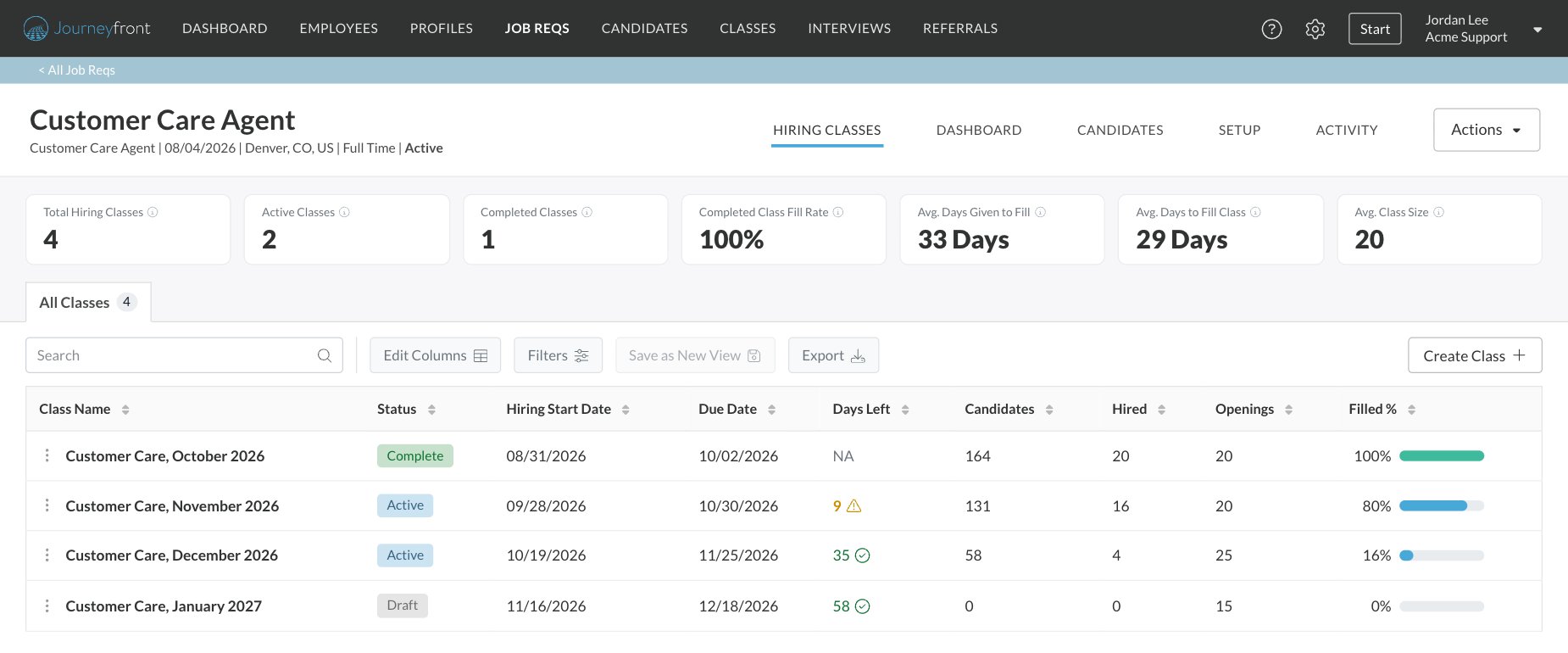
- Progress at a glance. See how many openings each class has filled.
- Better reporting. Compare classes side by side to see which waves filled fastest and retained best.
Where to find them
- On a job req: open the Hiring Classes tab to see that job req’s classes.
- Across your company: select Classes in the top navigation to see every class you have access to, with openings and percent filled.
FAQ
When should I create a new job req instead of a new class?
When should I create a new job req instead of a new class?
Create a new class when you’re hiring more people for the same role with the same process. Create a new job req when the role, location or hiring process is meaningfully different.
Can a candidate move to a different class?
Can a candidate move to a different class?
Yes. You can change a candidate’s hiring class from their Candidate Application or with a bulk action on the Candidates page.
Why can't I see a class on the Classes page?
Why can't I see a class on the Classes page?
You see classes for the job reqs you’re on. Ask your admin about the All Hiring Classes permission if you need to see every class.
Related
Workflows overview
The path candidates follow on each job req.
How the pieces connect
How job reqs, workflows, postings, candidates and hiring classes relate.