

Who can do this: Deleting an activity’s score needs the Can Delete Scores permission. Turning on re-applying for a job req needs Manage Job Req Settings.
Two different kinds of retake
Delete an activity’s score
You can delete the score of screening questions, typing tests, behavioral assessments, internet speed tests and system requirements tests. Language assessment and skills test scores can’t be deleted.1
Open the Steps tab
Open the candidate’s Candidate Application and select the Steps tab. Expand the step with the activity.
2
Hover over the activity's score
On the activity’s row, hover over its score in the Assessments or Screening Questions column. It changes to Delete Score.
3
Confirm
Click Delete Score, then click Yes at Delete? (or No to keep the score).
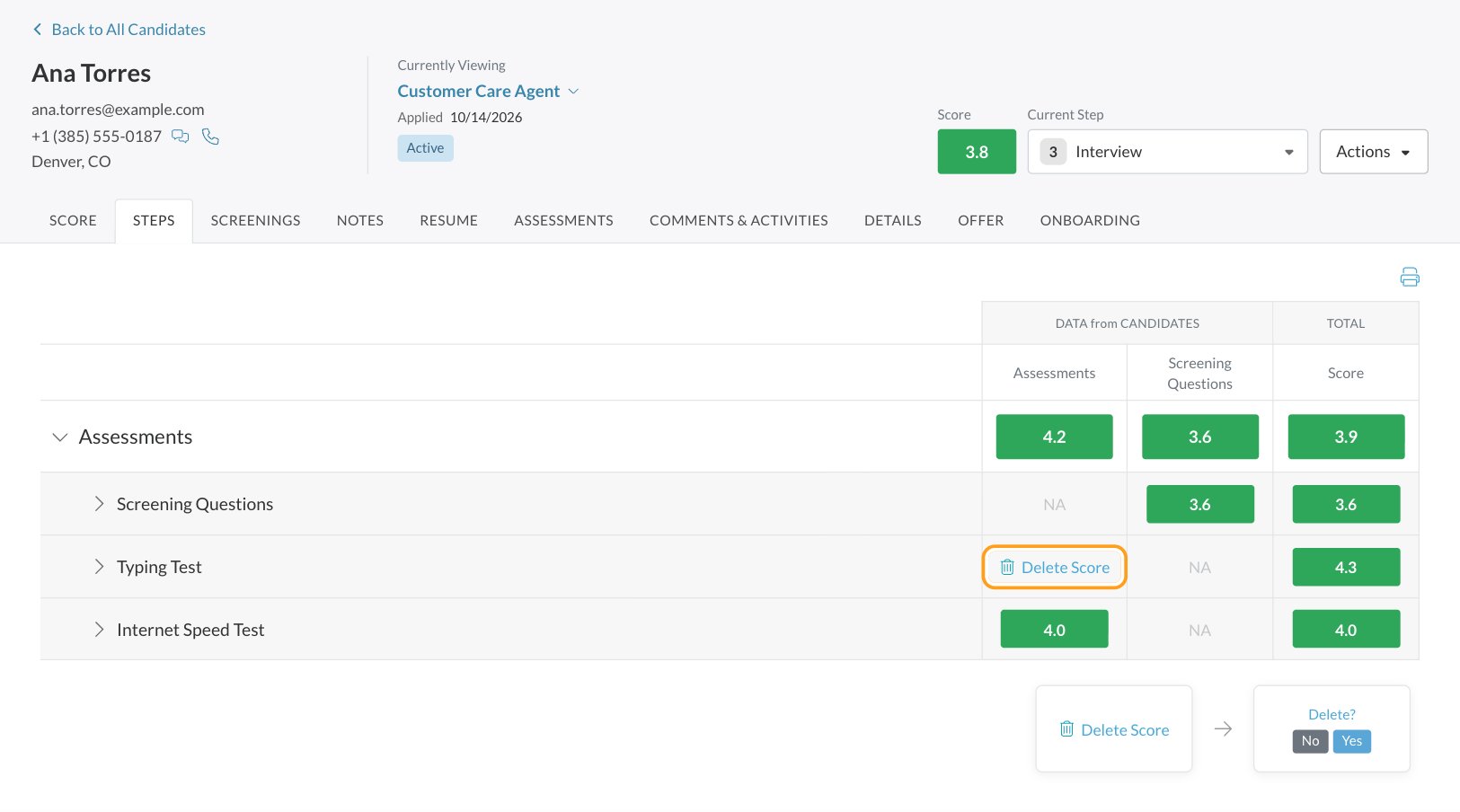
What happens when you delete a score
- The activity’s results are cleared. Its scores show NA, and the candidate’s other scores, including the overall score, are recalculated.
- The activity starts over. It goes back to not started, and the candidate can take it again from their application. They answer every question in the activity again, not just the one that went wrong, and any time limit starts fresh.
- The application’s status changes to Incomplete until they finish.
- It’s recorded. An Activity Score Deleted entry, with who did it, appears in the Candidate Application’s activity history on the Comments & Activities tab.
Give someone permission to delete scores
Go to Settings, then Security, edit the security role and turn on Can Delete Scores (in Scores & Interviews). See Security roles.Other ways to change a result
- A single answer you scored by hand: change or remove it on the Screenings tab, without resetting the activity. See Reading a candidate’s scores.
- AI scores: users with Edit AI Scores can change them. See AI-scored questions.
- Interview feedback: someone with Can Unlock Interviews unlocks it so the interviewer can resubmit. See Conduct an interview.
- System requirements results that didn’t arrive: click Retry on the Assessments tab. See System requirements test.
Let candidates re-apply to a job req
Allow Re-Takes lets someone who already applied to a job req apply to it again, after a waiting period you choose. It’s off by default.1
Open the job req's configurations
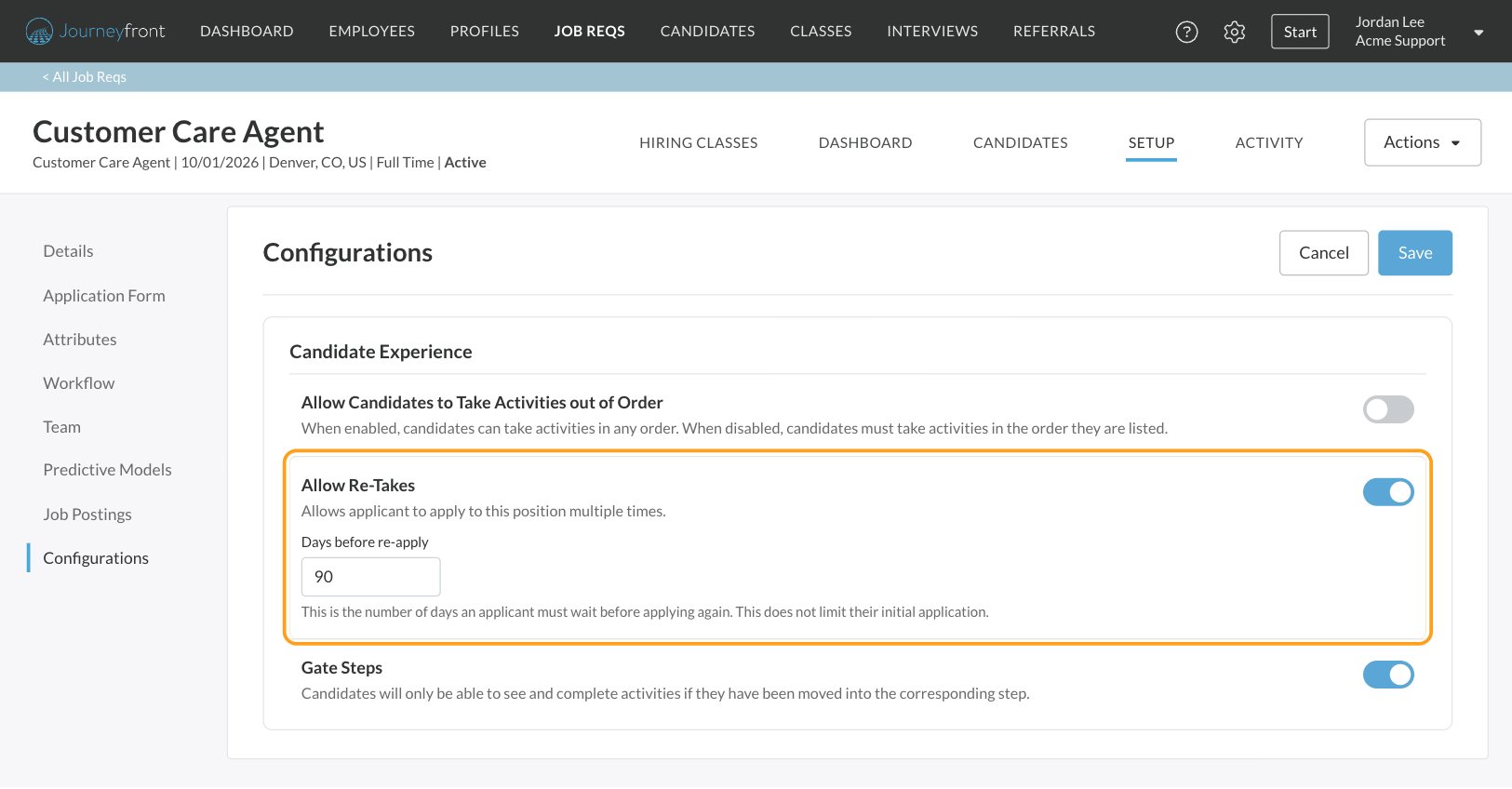
Open the job req and go to Setup, then Configurations.
2
Turn on Allow Re-Takes
In the Candidate Experience card, turn on Allow Re-Takes.
3
Set the waiting period
Enter Days before re-apply: how many days someone must wait after applying before they can apply again. It doesn’t limit their first application.
4
Save
Click Save at the top of the page.
FAQ
Can I delete the score for just one question?
Can I delete the score for just one question?
No. Deleting a score resets the whole activity, and the candidate answers all of its questions again. To change one answer’s score instead, edit it on the Screenings tab if it was scored by hand.
Why don't I see Delete Score?
Why don't I see Delete Score?
Check three things: your security role needs Can Delete Scores; you need to hover over the activity’s own score on the Steps tab, not a question or attribute row; and language assessments and skills tests can’t be deleted.
Can a candidate retake an activity on their own?
Can a candidate retake an activity on their own?
No. Once an activity is complete, the candidate can’t restart it themselves. Deleting its score is what reopens it.
How do I let a candidate retake a language assessment or skills test?
How do I let a candidate retake a language assessment or skills test?
Their scores can’t be deleted from the Candidate Application. Contact your Customer Success Manager.
Is Allow Re-Takes the same as deleting a score?
Is Allow Re-Takes the same as deleting a score?
No. Allow Re-Takes is about applying to the job req again after a waiting period, which starts a new Candidate Application. Deleting a score lets a candidate redo one activity on their current application.
Can I see who deleted a score?
Can I see who deleted a score?
Yes. Every deletion is recorded as Activity Score Deleted in the activity history on the Comments & Activities tab, with who made the change.
Related
Reading a candidate's scores
The Steps, Score, Screenings and Assessments tabs.
Job settings
Allow Re-Takes and other candidate experience settings.
Security roles
Give a role the Can Delete Scores permission.
Assessments overview
Every assessment and what candidates need.