

Availability: Each AI feature needs to be turned on for your account, and some also need a permission or a setting on each job req. Ask your Customer Success Manager. AI agents use AI credits.
Where you’ll find AI
AI resume scoring
Scores each resume against the attributes you set for the job, explains every score and highlights the lines behind it.
AI-scored questions
Scores video, audio and written screening answers from 1 to 5 against your scoring criteria, with its reasoning.
AI agents
Follow up with candidates who stalled, by email, text or WhatsApp, with your team approving messages when you choose.
AI Connections
Connect your own AI assistant to read your Journeyfront data.
Our principles
People make the decisions
AI in Journeyfront informs decisions; it doesn’t make them. AI scores are one input alongside your assessments, interviews and your team’s judgment. AI doesn’t hire, reject or move candidates, and AI agents can only send messages. Your automation rules are yours to design. If a rule acts on scores, those scores can include AI scores, so build rules that send borderline candidates to a person for review rather than rejecting them outright. See Automation rules.People can review and change every AI result
- Every AI score shows its reasoning, and resume scores highlight the evidence in the resume.
- Your team can change any AI score. For resume scores, edited attributes are marked as edited by a person.
- AI agents can wait for approval. For each channel, choose whether an agent sends on its own, asks when it’s unsure, or always asks first.
AI only sees what the task needs
Each AI feature works from the information it needs for its job: the resume and the job’s attributes, a candidate’s answer and your scoring criteria, or a candidate’s progress and message history. AI agents work only from hiring workflow data, never from protected characteristics like age, gender or race.Your data isn’t used to train AI models
Your candidates’ and employees’ data isn’t used to train the AI models that Journeyfront’s features use.Security
AI features run inside the same security program as the rest of Journeyfront, which is SOC 2 compliant.AI Connections
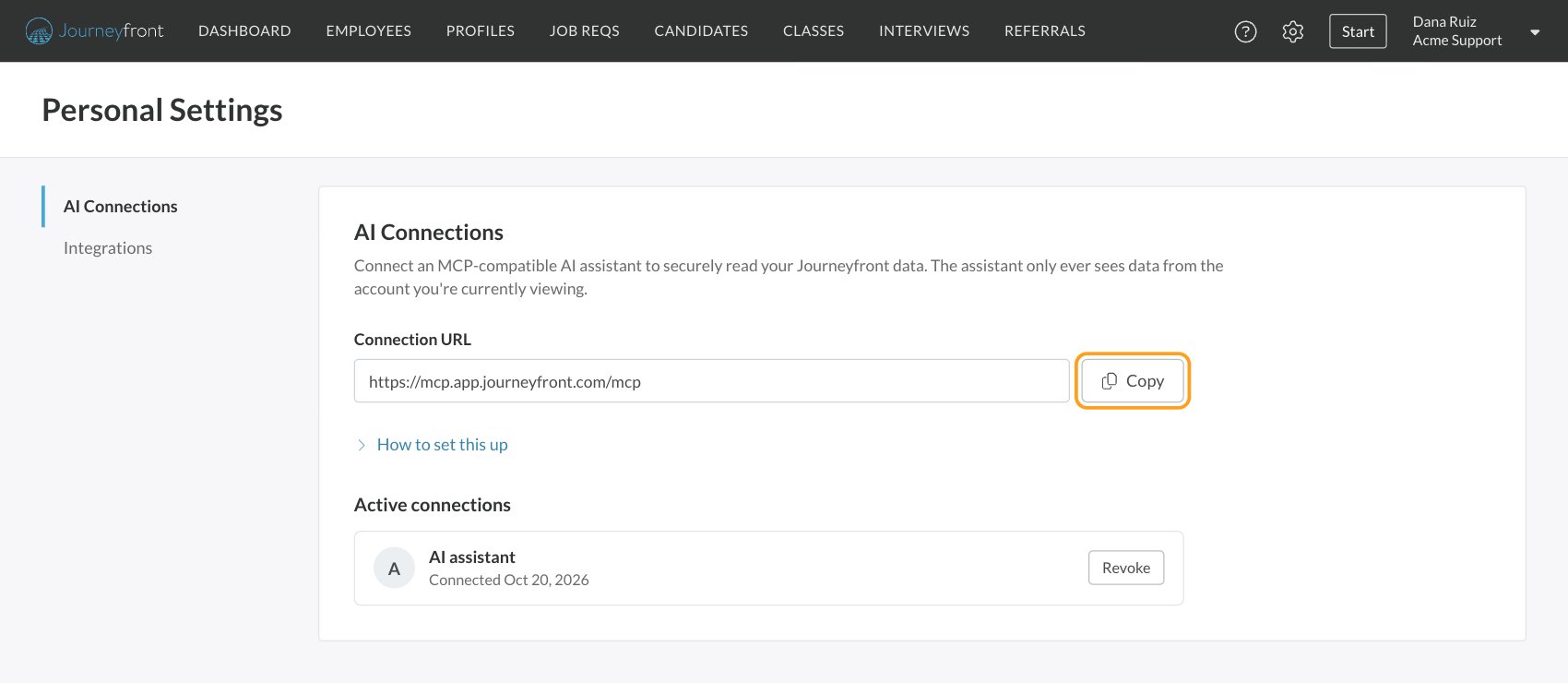
With AI Connections, you can connect an AI assistant that supports MCP (Model Context Protocol) to your Journeyfront account, and ask it about your candidates and applications in plain language. The assistant reads your data; it can’t change anything in Journeyfront.1
Open AI Connections
Click your name at the top right, then Personal Settings, then AI Connections.
2
Copy the connection URL
Click Copy next to Connection URL, and follow How to set this up for your assistant.
3
Approve access
Your assistant sends you to Journeyfront to sign in and approve access. Once approved, it appears under Active connections.
Automation that isn’t AI
Some features do work for you without AI:- Automation rules follow exactly the rules your team sets. See Automation rules.
- Fraud flags come from automated checks on each application and give it a risk level for your team to review. See Fraud flags.
- Predictive models are statistical models Journeyfront builds from your own employees’ outcomes. See Predictive models.
FAQ
Is AI deciding who gets hired?
Is AI deciding who gets hired?
No. AI scores and agent messages support your team. People review the results, can change them, and make every hiring decision.
Can we use Journeyfront without AI?
Can we use Journeyfront without AI?
Yes. Each AI feature is turned on for your account only when you ask, and AI resume scoring and AI-scored questions are also turned on per job req or per question. Everything else in Journeyfront works without them.
Can we see why the AI gave a score?
Can we see why the AI gave a score?
Yes. Every AI score comes with its reasoning, and resume scores highlight the lines of the resume behind them.
Can the AI get it wrong?
Can the AI get it wrong?
Yes, which is why people stay in the loop. AI only judges what’s in front of it: it can’t confirm a claim is true, and it can’t credit experience a candidate left out. Treat a low AI score as a reason to look closer, not a verdict, and change any score you disagree with.
Is our data used to train AI models?
Is our data used to train AI models?
No. Your candidates’ and employees’ data isn’t used to train AI models.
Do we need to tell candidates we use AI?
Do we need to tell candidates we use AI?
Rules about using AI in hiring differ by location, and some require notice to candidates. Check with your legal team about the places you hire.
How do we turn on an AI feature?
How do we turn on an AI feature?
Ask your Customer Success Manager to turn it on for your account. Then give the right people the permissions in Settings, then Security, and turn the feature on where you want it: on a job req for AI resume scoring and AI agents, or on a question for AI scoring. See Security roles and permissions.
Related
AI resume scoring
Score resumes against the job’s attributes.
AI-scored questions
Score video, audio and written answers.
AI agents
Follow up with stalled candidates.
How scoring works
How AI scores fit into a candidate’s overall score.