![jf_logo_on_white_150.png]](https://help.journeyfront.com/hs-fs/hubfs/jf_logo_on_white_150.png?height=29&name=jf_logo_on_white_150.png)
Adding Company Attributes
- Sign in at https://app.journeyfront.com/login
- Click the gear icon on the top navigation bar.

- Click “Attributes” on the left side panel.
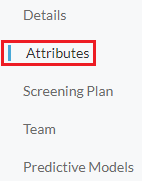
- Click "+Attribute".

- Fill in the Attribute Name and Description.
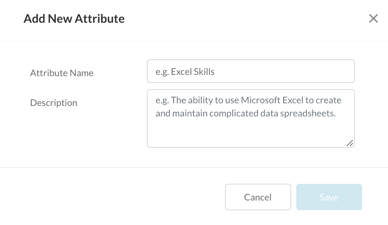
- Click “Save”.
Once the attribute is saved, you can use that attribute throughout your account.